Designing Beer Labels: Sizing and Dimensions
- bottle labels
- craft beer
- designers
- die cutting
- dimensions
- label design
- sizing
⚞ The Highlights:
- 12 oz can labels are typically around 3.625″–4″ tall by 7.5″–8″ wide. 16 oz can labels run around 5″ tall by 7.5″–8″ wide.
- Standard 12 oz beer bottle labels are typically 3.5″ by 4″ for the front, with a back label between 2.5″ by 2.5″ and 3″ by 4″. 22 oz bombers use larger labels, often 4″ by 5″ or bigger.
- Growler labels sit around 4″–5″ tall by 4″–6″ wide. Crowler labels typically run around 6″ by 9.5″.
- Three formats for cans: pressure-sensitive labels, shrink sleeves (full 360° wrap), or direct-printed cans (no separate label at all).
A good beer label design needs the right canvas. Beer cans and bottles only give you a few square inches to work with, so getting the dimensions right before you start designing is the difference between a clean rollout and a redesign two days before press. Below is a complete sizing reference for the most common beer containers, plus practical guidance for partial wrap, full wrap, custom shapes, and printed cans.
Looking for Custom Beer Labels?
We’ve partnered with over 1,500 breweries over the years, so our experience is as deep and rich as the beers we represent. With no minimum on order quantity, small seasonal batches and year-round signatures, you get the same quality and expertise with every sip.
Request a Quote Get a Sample Pack
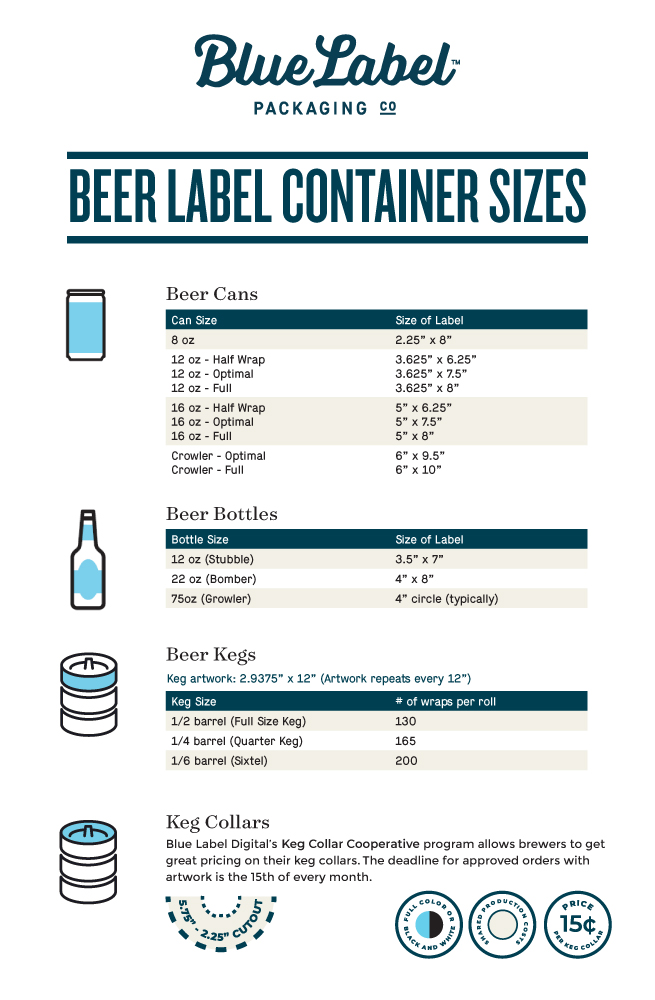
Beer label sizing reference
Quick reference for the most common beer container types and their typical label dimensions. Custom containers and unusual shapes can vary; always confirm against your specific bottle or can before finalizing artwork.
| Container | Volume | Typical label dimensions | Format options |
|---|---|---|---|
| Standard 12 oz can | 12 oz | 3.625″–4″ tall x 7.5″–8″ wide | PS label, shrink sleeve, or printed can |
| 12 oz sleek can | 12 oz | ~5″ tall x 7.5″ wide (narrower diameter) | PS label, shrink sleeve, or printed can |
| 16 oz tallboy can | 16 oz | ~5″ tall x 7.5″–8″ wide | PS label, shrink sleeve, or printed can |
| 19.2 oz stovepipe | 19.2 oz | ~6″–6.5″ tall x 8″ wide | PS label or shrink sleeve |
| 32 oz crowler | 32 oz | ~6″ tall x 9.5″ wide | PS label (typical) |
| Standard 12 oz bottle | 12 oz | Front: ~3″ x 3″ to 3.5″ x 4″ / Back: ~2.5″ x 2.5″ to 3″ x 4″ | Front + back PS labels (or full wrap) |
| 22 oz “bomber” bottle | 22 oz | Front: ~4″ x 5″ or larger / Back proportional | Front + back PS labels (or full wrap) |
| 500 mL (16.9 oz) bottle | 16.9 oz | Front: ~3.5″ x 4″ / Back proportional | Front + back PS labels (or full wrap) |
| Growler | 32 or 64 oz | ~4″–5″ tall x 4″–6″ wide (or ~4″ x 14″ wrap) | PS label, hang tag, or wrap-around |
| Half barrel keg collar | 15.5 gal | ~6″–7″ diameter (round) | Keg collar + optional keg wrap |
| Sixth barrel keg collar | 5.16 gal | ~5″–6″ diameter (round) | Keg collar + optional keg wrap |
For a fuller breakdown of beer container types and label format trade-offs, see Finding the Perfect Match: Beer Container Types and Beer Labels.
Consider the bottle or can first
Beer label sizing depends heavily on the size and shape of your container. A 3.5″ x 4″ label might work fine for a standard 12 oz bottle, but it won’t be enough for a 22 oz bomber. For non-standard shapes, the dimensions in the table above are starting points; your actual label will need to be sized to your specific container.
A practical trick before you commit to a design: cut a piece of paper to your initial dimensions, hold it up to the bottle or can, and trim until it fits the way you want. Measure the trimmed paper, and that gives you a real-world starting point for your artwork.
Custom or unusual shapes need extra attention. A wider, shorter label can suit a stubby bottle. A narrower, taller label can read better on a longneck. Match the label to the bottle’s silhouette before you start designing the inside of the rectangle.
Partial wrap vs. full wrap labels
Once you have your bottle or can in mind, decide on the label format. Beer labels typically come in two configurations:
Partial wrap
A partial-wrap setup uses two separate labels: one for the front of the bottle and one for the back. Standard bottle dimensions like the 3.5″ by 4″ we mentioned for a 12 oz bottle apply here. Front and back can be different sizes if the design calls for it.
Important note for production: if you’re using an applicator with rolled labels, the applicator needs to handle front and back labels on the same roll, which usually means programming the gap between the front and back labels. Confirm your applicator setup early in the project.
Some minimalist designs only use a small front label without a back. Those work, but the bottle still needs to carry required regulatory information (TTB beer label requirements, ABV, government warning, etc.) somewhere. Either on a small back label, on the cap, or printed on the bottle itself.
Full wrap
A full-wrap label runs around the whole bottle or can, with one end stopping just short of the other. Width is determined by the circumference of the container. Full wrap gives you more real estate for branding, ingredients, story, and required information, but the design has to work as one cohesive piece rather than two separate front-and-back canvases.
For cans specifically, full-wrap branding is also achievable through shrink sleeves (a heat-shrunk film that wraps the entire can) or printed cans (the design printed directly on the aluminum). Each format has different trade-offs on cost, flexibility, and minimum order quantity.
Don’t be afraid of custom shapes
Custom die cutting lets you design a label in any shape beyond standard rectangles and ovals. Contour cuts that follow the silhouette of an illustration, decorative outlines, asymmetrical shapes, anything beyond the basic rectangle.
Sizing a custom shape on a curved container takes extra work. Cut a rectangular piece of paper that wraps the main body of the bottle, then trim it to the shape you want and wrap it back around to see how it sits. That gives you a base measurement to work from. A few practical considerations:
- Avoid sharp corners and acute angles. They can tear during the matrix removal step of die cutting.
- Add a small radius to corners. Even on shapes that look angular, a 1–2pt radius makes peeling and applying cleaner.
- Mind the curve. The label has to bend with the bottle. Highly geometric shapes can warp visually when applied to a curved surface.
For more on custom shapes and die cutting, see What Does Die Cut Mean?.
Printed cans: a third option for 12 oz and 16 oz cans
If you’re working with 12 oz or 16 oz cans, there’s a third format beyond pressure-sensitive labels and shrink sleeves: printed cans. The design is printed directly onto the aluminum using digital direct-to-object printing, so there’s no separate label at all. The artwork is part of the can itself.
Printed cans remove the label-sizing question for the body of the can entirely. The design just needs to fit the printable area of the can format you’re using:
- 12 oz Standard: ~7.6″ wide x 4.13″ tall printable area
- 12 oz Sleek: ~7.13″ wide x 4.55″ tall printable area
- 16 oz Standard: ~7.6″ wide x 4.95″ tall printable area
(Exact printable dimensions depend on the can stock and the printer’s setup. Confirm with your printer before designing.)
Minimums for printed cans are typically around 1,500 to 2,000 cans per design. Accessible for a single seasonal SKU, especially compared to traditional offset can printing where minimums historically ran into the hundreds of thousands.
Sending artwork to the printer
Once your sizing and design are dialed in, your printer will need the artwork in a usable format. We accept Adobe Illustrator (.ai), high-resolution PDF, or EPS files. Specifics that help the artwork process go smoothly:
- Set up the die line correctly. The die line is the cut outline. In Illustrator, mark it as a specific spot color on its own layer, set as a joined line.
- Add a 1/16″ bleed past the cut outline, so no white edges show after cutting.
- Outline all fonts. If we don’t have your font, outlined fonts make sure type renders the way you intended.
- CMYK color mode for everything that prints in color. RGB designs can shift in color when converted for press.
If you don’t have artwork templates for common can and bottle sizes, your printer can usually provide them. Working from a real template avoids the back-and-forth of resizing artwork that started off in the wrong dimensions.
Frequently asked questions
What size is a standard 12 oz beer can label?
A standard 12 oz beer can label is typically 3.625 to 4 inches tall by 7.5 to 8 inches wide when applied as a pressure-sensitive label. Shrink sleeves for a 12 oz can run roughly 5 to 6 inches tall and cover the full body. Direct-printed cans use the can’s full printable area, which is approximately 7.6 inches wide by 4.13 inches tall on a 12 oz Standard can.
What size is a 16 oz beer can label?
A 16 oz tallboy can label is typically around 5 inches tall by 7.5 to 8 inches wide as a pressure-sensitive label. Shrink sleeves for a 16 oz can are roughly 6 to 7 inches tall. Direct-printed cans use the full printable area of about 7.6 inches wide by 4.95 inches tall.
What size are beer bottle labels?
Standard 12 oz beer bottles typically use a front label around 3 to 3.5 inches by 3.5 to 4 inches, with a back label between 2.5″ x 2.5″ and 3″ x 4″. Larger 22 oz bomber bottles use bigger labels, often 4″ x 5″ or larger. Wrap-around labels for any bottle size are sized by the bottle’s circumference.
What’s the difference between partial wrap and full wrap labels?
A partial wrap uses two separate labels (front and back) with bare bottle showing on either side. A full wrap runs around the whole bottle as a single label, with one end stopping just short of the other. Full wrap gives you more design real estate but requires a single cohesive design instead of two separate pieces.
What size is a growler label?
Growler labels typically sit around 4 to 5 inches tall by 4 to 6 inches wide, depending on the curve of the bottle. Some breweries use larger wrap-around labels (around 4 inches by 14 inches) for full-coverage branding on the side of the growler.
What size is a crowler label?
Crowlers (32 oz aluminum cans filled at the brewery) typically use pressure-sensitive labels around 6 inches tall by 9.5 inches wide. Most breweries apply the label at the time of fill, so the same blank crowler stock can serve multiple SKUs with different labels.
How do I figure out the right label size for a custom bottle?
Cut a rectangular piece of paper to a starting size, hold it against the bottle, and trim until it fits the way you want. Measure the trimmed paper to get a real-world starting dimension for your artwork. Keep an eye on curves and shoulders. Labels need to sit on a relatively flat zone of the bottle, not on the steepest part of the curve.
Work with a label printer that knows beer
Every great beer label needs a great printer. The right partner helps you get the dimensions right, picks materials and finishes that fit the brand, and catches issues before they become reprints.
At Blue Label, we work with breweries through every step of the process. Sizing, artwork, materials, finishes, proofs, and production. Take a look at our custom beer can labels page for an overview, or request a sample pack to feel materials and finishes on real label stock. Get in touch if you have specific questions about your bottle, can, or design.