How to Get a Barcode, UPC, and QR Code for a Product Label
⚞ The Highlights:
- A UPC is the unique number that identifies your product. The barcode is the scannable image of that number. A QR code is a separate 2D code, usually for marketing.
- The official way to get a UPC is to license a company prefix from GS1, the global standards body that issues them. Major retailers and Amazon Brand Registry expect GS1 barcodes.
- Reseller barcodes are cheaper and have no annual fee, but they aren’t registered to your brand and can be rejected by big retailers. They fit some situations and not others.
- QR codes are free to generate. Static ones are fixed forever; dynamic ones can be edited and tracked, but need a service to host them.
- Getting the number is the easy part. The detail that trips brands up is printing a barcode that actually scans, which comes down to size, quiet zones, color, and finish.
Getting a barcode for your product comes down to three separate things: a UPC (the unique number that identifies your product), the barcode (the scannable image of that number), and, if you want one, a QR code for marketing. You get the UPC by licensing a company prefix from GS1, the barcode image comes with it, and QR codes you can generate for free. The part most brands underestimate is the last step, making sure the printed barcode actually scans.
We print labels with barcodes and QR codes on them every day, so we see both ends of this: getting the codes, and getting them to scan on a real label. Here’s how to do both. One note: barcode pricing and platform rules change, so treat the numbers below as a starting point and confirm current details with GS1 or the retailer you’re selling into.
UPC, barcode, QR code: what’s the difference?
These three terms get used interchangeably, but they’re different things. Sorting them out first makes the rest of the process a lot clearer.
| UPC | Barcode | QR code | |
|---|---|---|---|
| What it is | A unique 12-digit product number | The scannable image of a number like a UPC | A 2D square code that holds more data |
| Format | Numbers only | 1D lines and spaces | 2D grid of squares |
| Main use | Identifying a product at retail | Checkout and inventory scanning | Linking to a website, promo, or info |
| Where you get it | GS1 (or a reseller) | Comes with your UPC license | Free online generator |
What is a UPC?
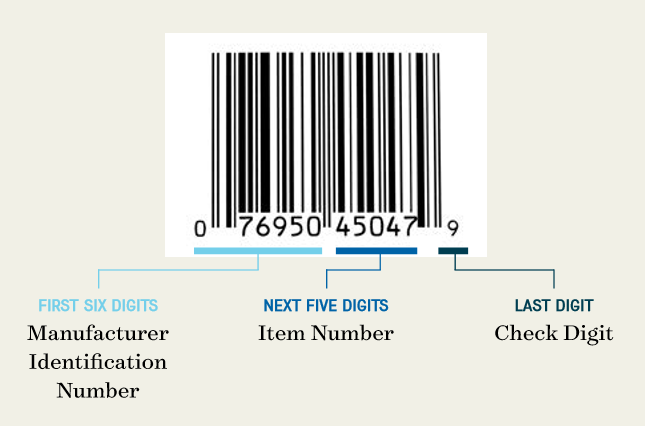
A UPC (Universal Product Code) is the 12-digit number that uniquely identifies a specific product. Every version of a product, each size, flavor, or color, gets its own UPC. It’s what a retailer’s system reads to pull up the right item and price at checkout.
What is a barcode?
A barcode is the machine-readable image, the pattern of black bars and white spaces, that encodes a number like a UPC. When people say they “need a barcode,” they usually mean they need both the UPC number and the printed image of it. The most common retail barcode in the U.S. is UPC-A.
What is a QR code?
A QR code is a two-dimensional code, a grid of small squares, that can hold much more information than a barcode, up to thousands of characters. Instead of identifying a product at checkout, QR codes usually send a shopper somewhere: a website, a promotion, a how-to video, or product details. They’re a marketing tool, not a retail requirement.
How do you get a UPC barcode?
The official route is GS1, but it isn’t the only route, and which one is right depends on where you’re selling. Here’s how to decide.
Get it from GS1 (the official route)
GS1 is the global nonprofit that manages the UPC system. You license a GS1 Company Prefix, which becomes the front portion of every UPC you create. You then assign the rest of the digits to your individual products, and the system calculates a final check digit to complete each 12-digit code. Because the prefix is registered to your business in the GS1 database, retailers can verify that the code genuinely belongs to you. You can get started at GS1 US.
How much does a GS1 barcode cost?
GS1 pricing depends on how many barcodes you need. A single GTIN (one barcode) is a one-time $30 with no annual renewal. A GS1 Company Prefix, which makes sense once you need several codes, starts at $250 up front plus a $50 annual renewal for up to 10 products, and scales from there (100 products runs $750 up front plus $150 a year). GS1 updates its pricing periodically, so check their site for the current numbers before you budget.
GS1 vs. reseller barcodes: which should you use?
You’ll also find companies selling individual barcodes for a few dollars with no annual fee. These are usually numbers from older GS1 prefixes issued before 2002, resold to many buyers. They can work, but there are real trade-offs.
| GS1 barcode | Reseller barcode | |
|---|---|---|
| Cost | Higher, with an annual fee | Low, usually one-time |
| Registered to your brand | Yes, in the GS1 database | No, shows the original prefix owner |
| Major retailer acceptance | Widely accepted | Often rejected by large chains |
| Amazon Brand Registry | Required | Not accepted |
| Best for | Brands headed to retail or Amazon at scale | Small runs, internal use, some online marketplaces |
Do you even need a barcode?
Maybe not yet. If you’re selling direct from your own website or at a market, you can hold off on a barcode for now. You need one once you sell through retailers or distributors that scan products, and most major chains (and Amazon Brand Registry) specifically want GS1-registered codes. If retail is the plan, going straight to GS1 saves you from re-labeling later.
Ready to put a barcode on your label?
We print product labels with barcodes and QR codes that scan the first time. Send us your code and artwork, and we’ll make sure it’s sized, spaced, and printed to scan cleanly.
Request a Quote Get a Sample Pack
How do you get the barcode image?
Once you have your UPC number, you need the printable barcode image to put on your label.
From the GS1 Data Hub
When you license a prefix and create your product codes, GS1 provides tools (the GS1 US Data Hub) to generate the barcode images that match your numbers. You can download those images and hand them to your designer or printer. If you bought a reseller code, the seller typically provides the barcode image file too.
Barcode types you might run into
- UPC-A. The standard 12-digit retail barcode in the U.S. and Canada. This is what most products use.
- EAN-13. The 13-digit international equivalent, common outside North America.
- UPC-E. A compressed 8-digit version for very small packages where a full UPC-A won’t fit.
- Code 128. A denser barcode used more for shipping, cases, and internal tracking than for retail checkout.
How do you get a QR code?
QR codes are the easy one. You don’t register them with anyone. A free online QR code generator turns a link or text into a downloadable QR image in seconds. The choice worth thinking about is static versus dynamic.
Static vs. dynamic QR codes
A static QR code is fixed. The link is baked in and can’t be changed once it’s printed, and it’s free forever. A dynamic QR code points to a short redirect you control, so you can change the destination later and track scans, but it usually requires a paid service to host and manage. If the QR code sends people to a page you might update, or you want scan data, dynamic is worth it. For a link that will never change, static is fine.
What to put behind a QR code
The best QR codes give the shopper a reason to scan: a how-to video, your brand story, a recipe, loyalty signup, lab results, or a promotion. A QR code that just opens your homepage rarely gets used. Give it a clear payoff and a short label telling people what they’ll get.
How to prepare barcodes and QR codes for your label
This is the step that gets skipped, and it’s the one we spend the most time on with customers. A barcode that looks fine on screen can still fail at the register if it’s printed too small, too tight to other elements, in the wrong colors, or on the wrong finish. Here’s how to avoid a code that won’t scan.
Why do barcodes fail to scan?
A barcode fails when the scanner can’t cleanly read the contrast between bars and spaces. That usually comes from one of four things: the code is too small, there isn’t enough blank space around it, the colors don’t contrast enough, or a shiny finish or curve is bouncing the scanner’s light. Each one is preventable if you catch it before the run.
Size and quiet zones
A UPC-A barcode has a nominal size (roughly 1.5 inches wide by 1 inch tall) and can be scaled within a range, commonly about 80% to 200% of nominal. Go too small and the bars blur together. Just as important is the quiet zone, the blank margin on each side of the barcode. UPC barcodes need a clear margin (a rough rule of thumb is at least an eighth of an inch, or the width of about ten bars, on each end). Crowd the barcode with other artwork and the scanner loses the edges.
Color and contrast rules
- Dark bars, light background. Black bars on a white background is the safest choice. High contrast is what the scanner reads.
- Avoid red and warm tones for the bars. Many scanners use red light, which can’t “see” red, orange, or similar warm-colored bars. They can read as blank.
- Skip busy or dark backgrounds behind the code. A patterned or dark background kills the contrast the scanner needs.
Material and finish gotchas
The label itself can defeat a good barcode. Highly reflective finishes, like a glossy laminate or a metallic or foil material directly under the code, can bounce a scanner’s light and cause misreads. Clear labels can leave a barcode without the light background it needs. And on tightly curved containers or across a shrink-sleeve seam, a barcode can distort enough to fail. The safe move is to give the barcode a flat, matte, light area to live on.
Always verify before the full run
Before you print thousands of labels, confirm the barcode scans on the actual material and finish, not just on screen. A quick scan test (or a formal barcode verification) on a proof catches problems while they’re cheap to fix. This is exactly the kind of thing we check on a proof so a scanning issue never reaches your full run.
Getting your codes onto a label that scans
The path is straightforward: license a UPC from GS1 (or decide a reseller code fits your situation), download the barcode image, generate a QR code if you want one, then, most importantly, print them so they scan. That last step is where a printer who knows barcodes earns their keep.
That’s the part we handle for brands every day. Send us your barcode and QR files with your artwork and we’ll size, space, and print them to scan cleanly on your material. Request a sample pack to see our materials and finishes, or get in touch and we’ll help you get your labels print-ready.
Frequently asked questions
What is the difference between a UPC, a barcode, and a QR code?
A UPC is the unique 12-digit number that identifies a product. A barcode is the scannable image of that number, the pattern of bars and spaces read at checkout. A QR code is a separate two-dimensional code that holds much more data and is usually used for marketing, like linking to a website or promotion, rather than retail checkout.
How do you get a UPC barcode for a product?
The official way is to license a GS1 Company Prefix from GS1, the global body that manages the UPC system. The prefix becomes the front of every UPC you create, you assign the remaining digits to each product, and GS1 provides the matching barcode images through its Data Hub. Because the prefix is registered to your business, retailers can verify the code belongs to you.
How much does a barcode cost?
Through GS1, a single barcode (GTIN) is a one-time $30 with no annual renewal. A GS1 Company Prefix covering up to 10 products is $250 up front plus a $50 annual renewal, and larger tiers scale from there (100 products is $750 plus $150 a year). Reseller barcodes cost only a few dollars with no annual fee, but they aren’t registered to your brand. GS1 pricing changes, so confirm current rates on their site.
Should I buy a GS1 barcode or a reseller barcode?
Use GS1 if you’re selling through major retailers or Amazon Brand Registry, which require GS1-registered codes. Reseller barcodes are cheaper and have no annual fee, but they aren’t registered to your brand and are often rejected by large chains. They can work for small runs, internal use, or some online marketplaces.
How do you get a QR code for a product?
QR codes are free to generate. A QR code generator turns a link or text into a downloadable image, with no registration needed. A static QR code is fixed and free forever; a dynamic QR code can be edited and tracked later but usually requires a paid service. Give the code a clear payoff, like a video or promotion, so people have a reason to scan.
Why does my barcode fail to scan?
Barcodes usually fail because they’re printed too small, lack enough blank quiet-zone space around them, use low-contrast colors (dark bars on a light background scan best, and red bars often fail), or sit on a reflective or curved surface. Keeping the barcode at an adequate size with clear margins, high contrast, and a flat matte light area fixes most scanning problems.
What size does a UPC barcode need to be?
A UPC-A barcode has a nominal size of roughly 1.5 inches wide by 1 inch tall and can typically be scaled between about 80% and 200% of nominal. It also needs a quiet zone, a clear margin on each side, of roughly an eighth of an inch. Shrinking it below the minimum or crowding it with artwork can cause scan failures.
Ready to print a label that scans?
Once you have your UPC, barcode image, and any QR code, we’ll get them onto a label that scans cleanly the first time. Request a sample pack to see our materials, or get in touch and send us your files.
More on barcodes, QR codes, and print-ready labels: