Using AI for Label Design: A Practical Guide

We’re seeing more brands using AI to design or assist with the design of their labels. Brands get a great-looking mockup and send it over to print, only to find out that the artwork isn’t prepared properly for actual production.

Is using AI to assist with design bad? Not at all. In fact, AI can be an incredibly useful tool for brainstorming concepts, exploring creative directions, and generating early-stage label ideas. Where it often falls short is creating the final, print-ready files needed for production. 

As AI becomes a bigger part of the design process, we want to help you understand where these tools excel, where they can create challenges, and how to bridge the gap between an AI-generated concept and artwork that is ready for press. We’ll also share ways to guide AI tools toward more production-friendly results, helping you save time and avoid common pitfalls. 

What “Print-Ready” Actually Means

Before we talk about AI specifically, it helps to know what a printer is looking for. These are the same standards that have always applied to artwork, AI or not.

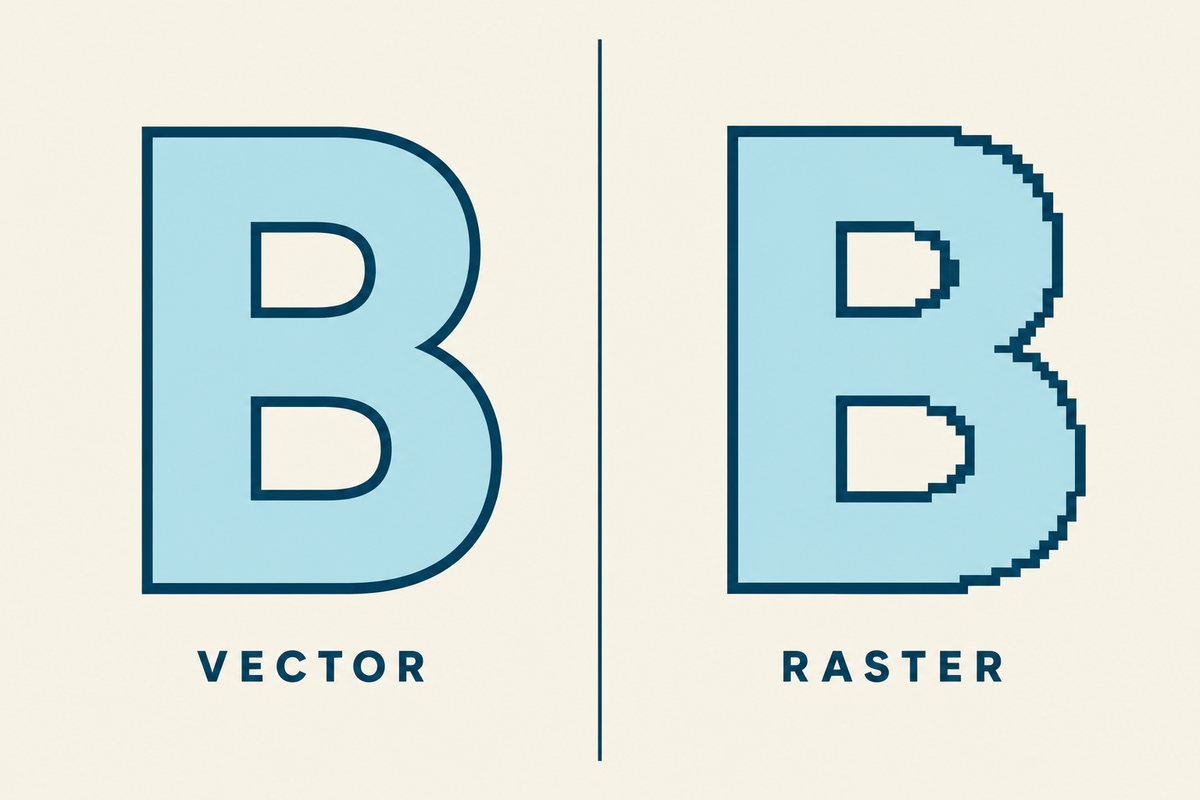
Vector vs. raster. Raster files are built out of pixels, like a photo. When you scale a raster image up much past its original size, the pixels start to show and the image gets blurry. Vector files work differently. They use paths and points, so the artwork stays sharp at any size. AI tools output raster files, which is one of the main reasons their artwork has to be rebuilt before it can go to press.

Vector vs. Raster

CMYK vs. RGB. Screens use RGB (red, green, blue). Presses use CMYK (cyan, magenta, yellow, black). Colors do not translate one-to-one between them. Bright neons, deep blacks, and rich greens are the ones that drift the most when a file gets converted. AI tools generate in RGB by default.

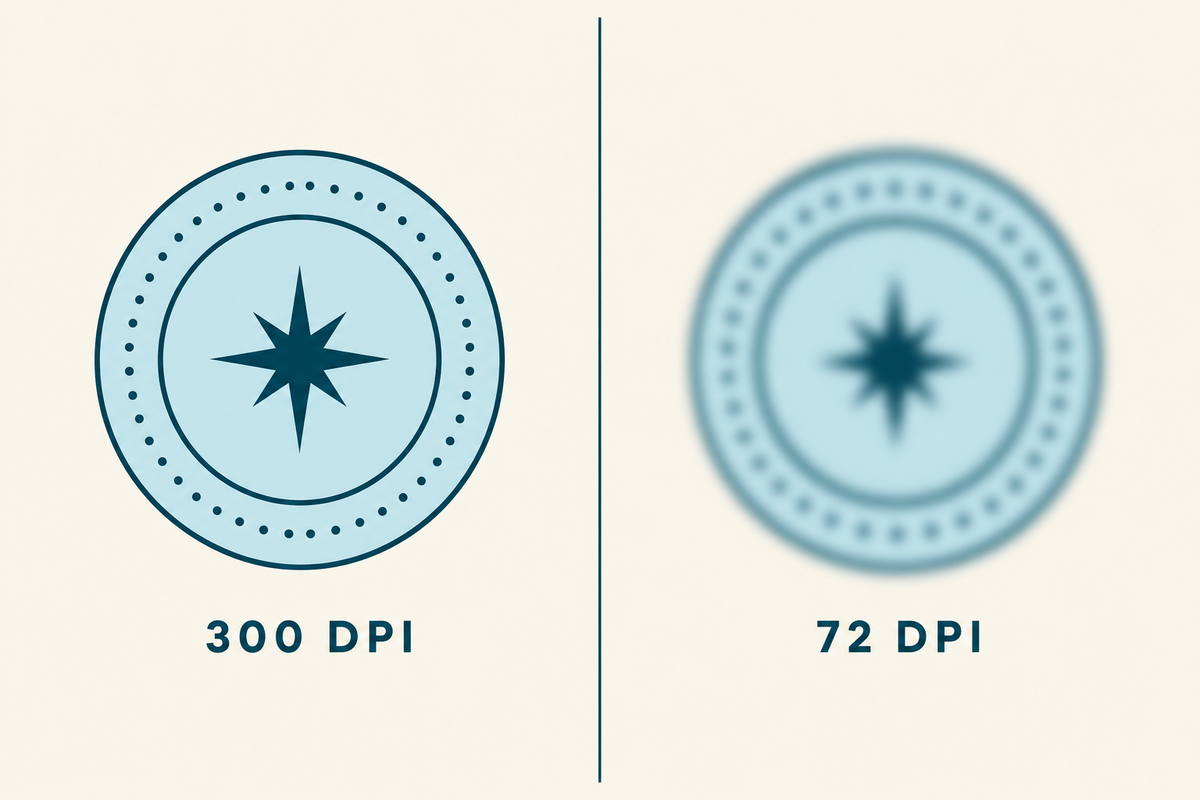
Resolution. Print files need to be at least 300 DPI at the final printed size. A label that prints two inches wide needs about 600 pixels of real detail across that two inches. AI tools usually generate at lower effective resolution than that, even when the canvas looks big.

300 DPI vs 72 DPI

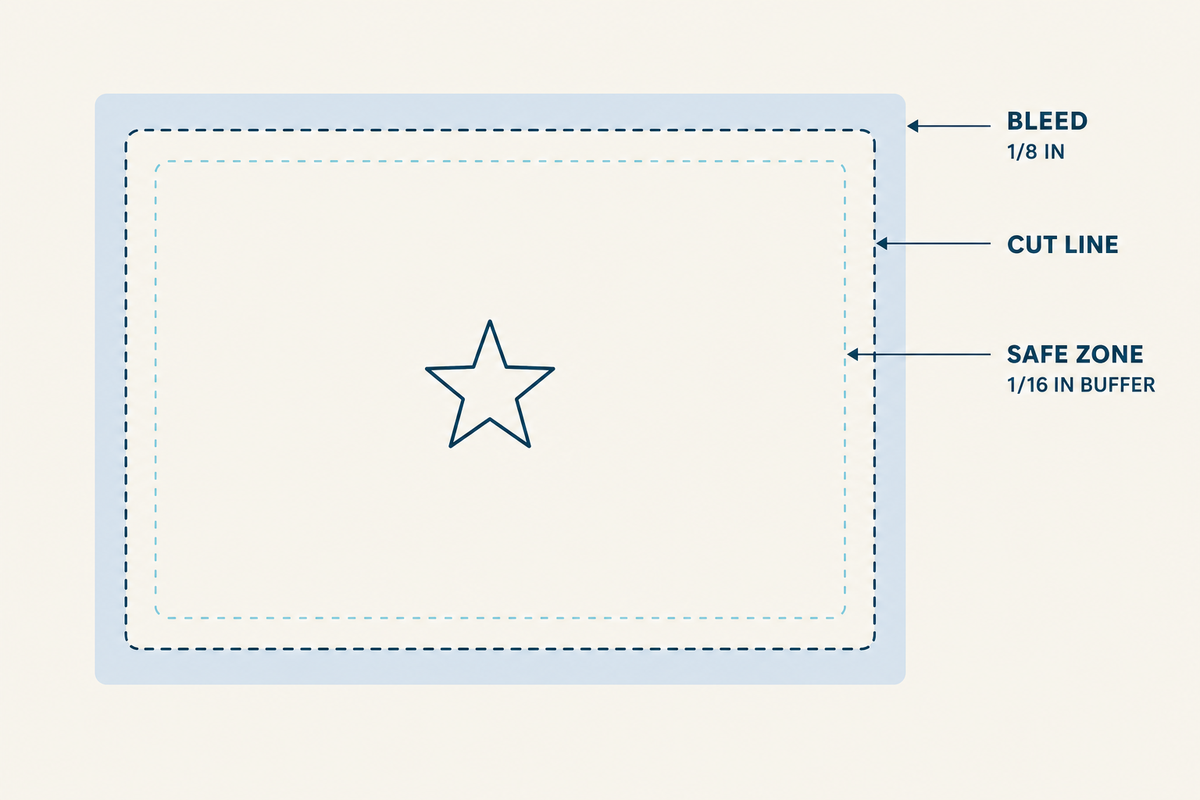
Bleed. The artwork has to extend past the cut line by 1/8″ on every side. That extra bit gets trimmed off after printing. Without bleed, a slightly off-center cut leaves a white edge on your label. AI does not know about bleed unless you tell it.

Safe zone. The safe zone is the inside version of bleed. Nothing important (text, logo, key visual) should sit within 1/16″ of the cut line, because cuts are precise but not always perfect. The safe zone gives you a buffer around the elements you cannot afford to have trimmed.

Label safe zone

Label template. Designers and printers call this a “dieline.” It is the outline of the actual label shape, sized at 100%, sitting on its own layer in the file. The label template tells the press where to cut.

Outlined fonts. Every piece of type in the final file needs to be converted from a font into a shape. Otherwise the press needs that font installed, and missing fonts are one of the most common reasons a job stalls in prepress.

Live barcodes. A barcode in a label file has to be a real generated code, not a picture of one. Pictures of barcodes do not scan. We get a lot of these from AI files.

Ink coverage. A label with heavy, saturated ink coverage across most of its surface can be hard on a press. Ink does not dry as fast, registration can drift, and the label can feel wet at takeoff. There are ways to handle this, but it has to be planned for.

Worth knowing: we go deeper on file specifications in our post on common art file mistakes. This guide focuses on what AI specifically does and does not do well in this context.

What Our Graphics Team Sees in AI-Generated Files

Our graphics team handles these files every day. Here is what they are seeing from AI right now:

“Mainly we are seeing AI-generated artwork arrive not truly print-ready for packaging and labels. Issues include low-res raster files instead of vectors, RGB color that shifts badly when converted to CMYK, and no consideration for spot colors or white ink. Text and barcodes are arriving rasterized or distorted, causing legibility and scan issues at small sizes. Files also rarely account for die lines, bleed, or finishing tolerances, and heavy ink coverage can create press stability problems.”

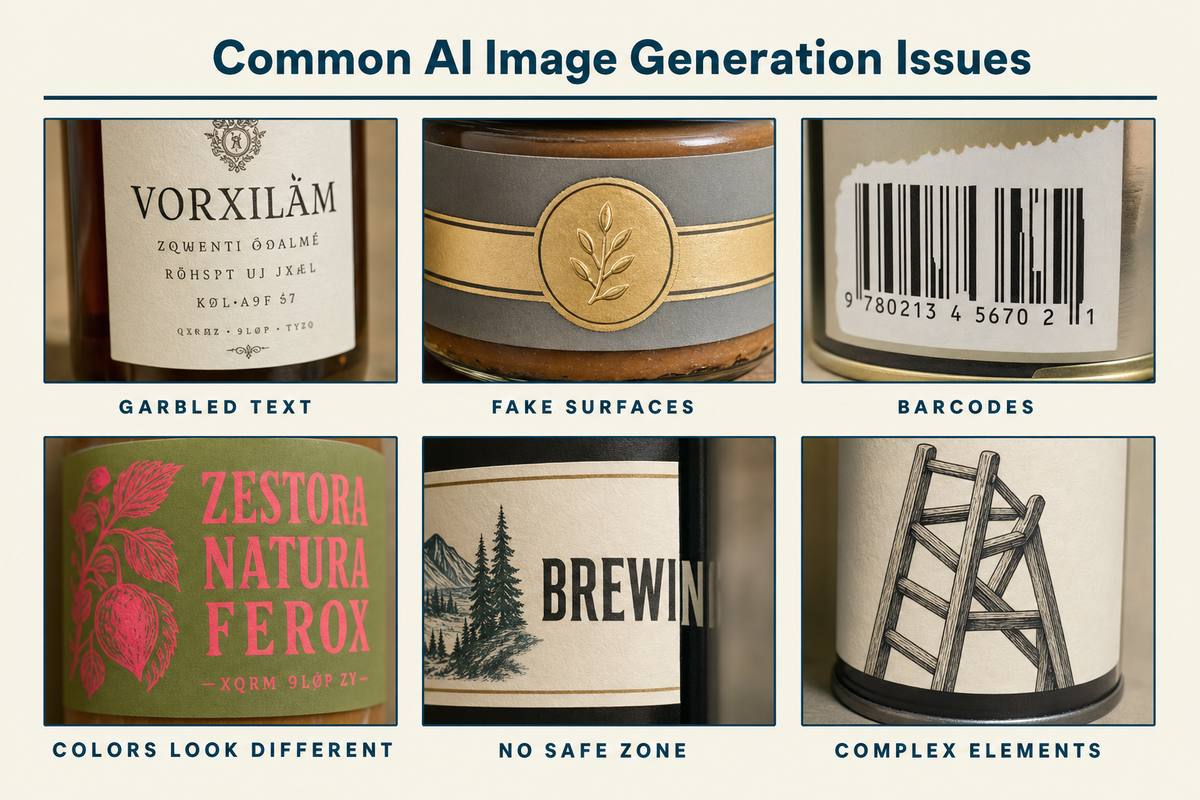
Common AI Image Generation Issues

A few patterns come up over and over:

  • The text comes out wrong. AI image tools invent letters, misspell brand names, drop characters, and warp type. Even when the type looks fine in a render, it is baked into the pixels. It can’t be edited, kerned, or outlined cleanly later.
  • Fake foil, fake gloss, fake holographic. AI loves rendering surfaces that look metallic or shimmery on screen. None of that translates to a press. Foil is a physical material, applied after printing. Gloss is a finish, not an image. When AI bakes a shimmer into the artwork, you get a flat image of a shimmer on the label, not the actual finish.
  • Barcodes that do not scan. AI renders barcodes the same way it renders any other visual: as a decorative imitation. The bars are not encoded, and the spacing is not accurate. Even when they look perfect, scanners cannot read them. 
  • Colors look different on the proof. This is the most common surprise. The mockup looks vivid and saturated on screen, the printed label comes back duller and slightly off. That is the RGB-to-CMYK shift in action, and it is more pronounced with bright colors. It’s also worth noting that there are some blend modes and transparency effects that are only usable on screen and in the RGB color space. If possible, include a note about CMYK or printable colors in your AI prompts.
  • No bleed, no safe zone. AI generates inside the canvas you specify and treats the edges as edges. There is no margin for trim, and important elements often sit right at the boundary.

This is not really a knock on AI. These tools were built to produce images that look good on a screen, and they do that well. Print-ready is a different problem from the one they were designed to solve.

How the Major AI Tools Differ for Label Work

The tools are not the same, and the differences matter when you are using them for label work. Knowing how each one behaves helps you pick the right one for the part of the process you are in.

AI Tools

Tool What it is good at Where it drifts What it cannot do
ChatGPT image generation (DALL-E / GPT image models) Takes detailed instructions well. Will respect explicit constraints. Good for first-pass concepts with specific requirements. Drifts toward illustrative or photoreal mockups if not constrained. Can over-render textures. True vector, true spot color, working barcodes, accurate Pantone matches.
Midjourney Aesthetic richness. Strong on mood, texture, lighting, and visual style. Best output if you are exploring a look. Least responsive to technical constraints. Loves rendering fake foil, fake gloss, fake metallics. Type is consistently weak. True vector, true spot color, working barcodes, editable layered output.
Adobe Firefly Closest path to a real production workflow. Outputs can be brought into Illustrator with less friction. Trained on commercially-safe data, which matters for brand use. Still raster at generation. Aesthetic range narrower than Midjourney. True vector at generation, true spot color, working barcodes.
Microsoft Copilot / Designer Convenient inside Microsoft 365. Quick concept passes without leaving the tools you already use. Uses similar underlying models to ChatGPT for many outputs. Same drift patterns. Same limits as ChatGPT and the others.
Claude Strong for creative direction, prompt writing, label copy, dieline-aware planning, critique, and translating brand strategy into design instructions. Can help structure production notes and identify print risks before artwork goes to a designer. Not a native image-generation tool for photos or illustrations. Better as a design director than a design generator. Can over-specify concepts that still need to be executed elsewhere. Direct generation of finished label artwork, true vector, true spot color, working barcodes, accurate Pantone matches, editable layered print files.
Google Gemini Good for quick concept exploration, image generation/editing, visual variation, and multimodal feedback. Strong when you want to iterate from written direction plus reference imagery. Can still drift toward polished mockups rather than production artwork. Type, small regulatory copy, exact layout discipline, and material/finish realism need careful checking. True vector at generation, true spot color, working barcodes, accurate Pantone matches, reliable print-ready typography, editable layered production files.


The takeaway across all four is similar. They are useful for the brainstorming and concepting side of label design, and they are limited for the production side. Pick the one that fits how you already work, and plan on bringing in a designer or your printer to take the concept to a file the press can run.

A Better Approach to Prompting AI for Label Design

No matter which AI platform you choose, you want to train it before you can rely on it to deliver what you want or don’t want. Build your prompts out of reusable blocks that you can mix, match, and iterate on one piece at a time.

There are four blocks we recommend keeping separate.

Block 1: The Persona Block

The persona block tells the AI what role it is playing, which sets the defaults for everything else. If you just ask for “a label design,” the output tends to be generic. If you set up the AI as if you were briefing a working production designer, the output usually tightens up.

Using AI prompting

A starter persona block:

“You are a print production designer creating artwork for a small commercial beverage brand. Your output will be evaluated against professional prepress standards. You design for a real press, not a screen.”

You can adjust this. A persona for a CPG hot sauce brand might emphasize shelf appeal. A persona for a winery might emphasize elegance and craft. The point is to give the model a role with specific defaults.

Block 2: The Technical Block

The technical block is where you spell out the print specifications. It is the part that feels tedious, and it is the block we would suggest locking in and reusing across every prompt so the specs stay consistent.

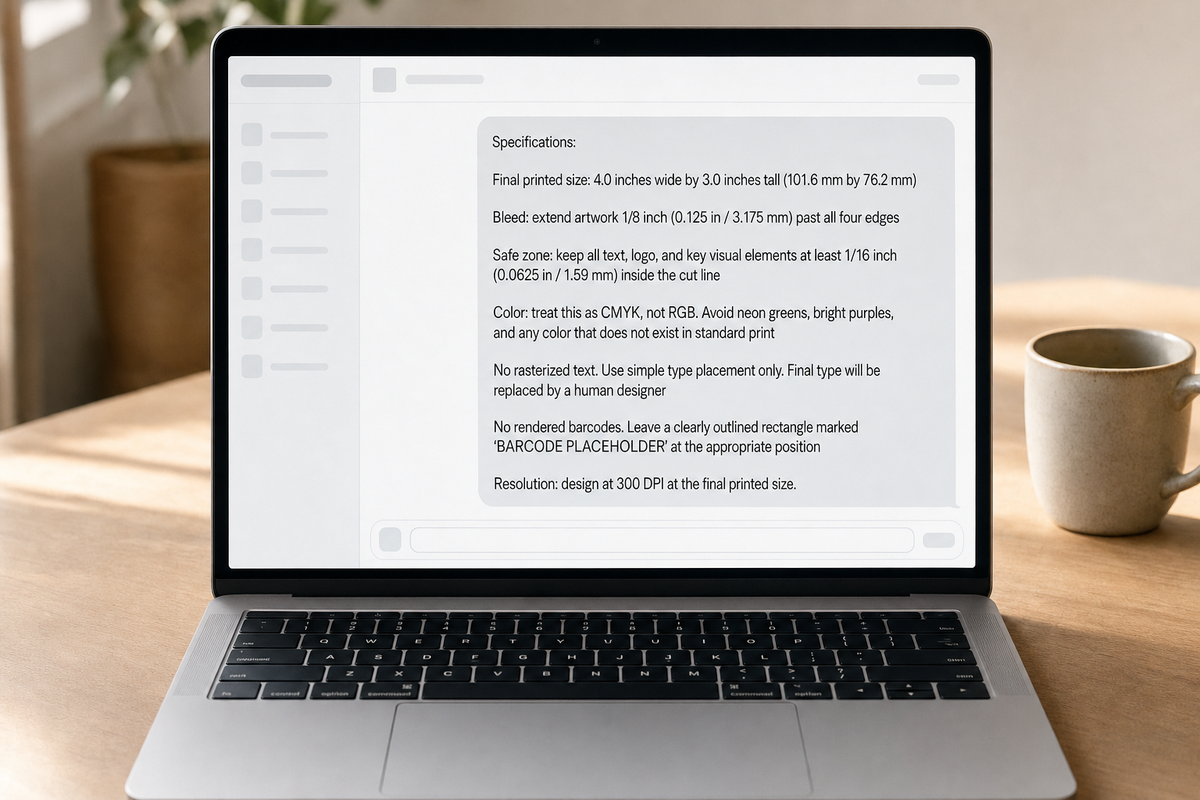
A technical block based on our own artwork file standards:

Specifications:

  • Final printed size: 4.0 inches wide by 3.0 inches tall (101.6 mm by 76.2 mm)
  • Bleed: extend artwork 1/8 inch (0.125 in / 3.175 mm) past all four edges
  • Safe zone: keep all text, logo, and key visual elements at least 1/16 inch (0.0625 in / 1.59 mm) inside the cut line
  • Color: treat this as CMYK, not RGB. Avoid any color that does not exist in standard print
  • No rasterized text. Use simple type placement only. Final type will be replaced by a human designer
  • No rendered barcodes. Leave a clearly outlined rectangle marked ‘BARCODE PLACEHOLDER’ at the appropriate position
  • Resolution: design at 300 DPI at the final printed size

Once you have a version of this block dialed in for a given product, the only thing you tend to change between prompts is the dimensions.

Block 3: The Visual Direction Block

This is where you describe the actual look you want, which is the creative side of the prompt. It is also where most prompts go off the rails, because people pack technical specs and visual direction into one paragraph and the AI gets confused about what it is being asked to do.

A visual direction block might look like:

Visual direction:

  • Mood: warm, modern, slightly nostalgic
  • Palette: deep navy, cream, a single accent of warm orange. Avoid neons and pastels
  • Typography style: sans-serif with a small handwritten brand mark.
  • Imagery: a stylized illustration of a sun or sunrise over a curved horizon line. Linework-led, not photoreal
  • Finish: Do NOT render fake foil, fake gloss, fake holographic, fake embossing, or any simulated metallic shimmer. The actual finish will be applied by the printer

Block 4: The Negative Constraints Block

The last block tells the AI what NOT to do. Negative constraints are surprisingly effective with these models.

Do not include:

  • Fake foil shimmer or metallic gradients
  • Fake glossy reflections or wet-look highlights
  • Decorative imitation barcodes or QR codes
  • Warped, stretched, or curved text
  • Off-brand colors or unexpected color shifts
  • Stretched, rotated, or modified logos
  • Visual artifacts (extra fingers, garbled letterforms, melted edges)
  • Heavy texture overlays that simulate paper, foil, or holographic surfaces

Stitching the Blocks Together

A complete prompt for a small-batch hot sauce label would be the four blocks stacked together in order: persona first, technical second, visual third, negative constraints last. That order gives the model the role, then the rules, then the look, then the things to avoid. Each block stands on its own, so you can rewrite one without having to redo the others.

What Still Needs a Human Designer After AI

This is the part of the process AI cannot do on its own (currently). A few things still need a designer or your printer:

  • Rebuilding the file as a true vector. A raster AI render gets rebuilt in Illustrator (or equivalent) before it goes to a press. This is where the logo gets cleaned up, the type gets set in real fonts, and the shapes get drawn as paths.
  • Real spot color and Pantone matches. If your brand has specific Pantones, those have to be specified as spot colors in the file, not approximated in CMYK.
  • White ink layers. For clear or metallic label stocks, white ink underlays the design where you want opacity. AI does not model this. It has to be added.
  • Working barcodes. The label needs a real scannable code. AI typically does not produce this well.
  • The label template. Your printer provides the dieline at your exact label dimensions. The artwork gets placed inside it.
  • Bleed, safe zone, and outlined fonts. All of these get enforced in the production file, not in the AI output.
  • Ink coverage and finish decisions. Foil, emboss, spot UV, soft-touch laminate, matte versus gloss. They can’t just be “rendered in.”

In Blue Label’s Expert Review, we check these things on every project before anything goes to press. If you want a closer look at the production side, we wrote about how a label goes from artwork to a finished product.

A Quick Pre-Press Checklist for AI Artwork

Before you send an AI-generated concept to a printer, run through this:

  • File format: PDF or AI file (we recommend high-resolution PDF, and we accept Illustrator files)
  • Resolution: at least 300 DPI at the final printed size
  • Bleed: 1/8″ past the cut line on all sides
  • Safe zone: 1/16″ inside the cut line
  • Type: the type should be built (or rebuilt) in real fonts (don’t rely on AI text)
  • Barcode: a real generated code, not a rendered imitation
  • Color: marked CMYK, or clearly labeled as RGB that needs conversion
  • Finishes: not baked into the artwork as fake textures
  • Pantones: any spot colors called out explicitly

You can also download our artwork templates for common label sizes, which already have the bleed and safe zones built in. They are a fast way to get your artwork into a real production layout before sending it over.

Working With Blue Label on AI Concepts

AI is part of how a lot of brands work now. What we will do is look at your file, tell you what works, tell you what needs to be rebuilt for press, and give you a clear path to a finished label.

If you want to send us an early concept, even a rough one, we are happy to take a look. We can tell you what to expect, what we will need, and what your options are for finishes and materials.

Send us your file or request a quote when you are ready. We are here if you have questions.

Digitally Printed Cans for Craft Breweries: What to Know Before You Order

If you’ve been canning with labels or shrink sleeves, you’ve probably looked at a nationally distributed brand’s printed can and thought: “That looks clean. How do I get that?”

Until recently, the answer was: order 100,000+ cans per SKU and wait 12 weeks. For most craft breweries, that was a non-starter.

Digital can printing has changed everything. You can now get printed cans in runs as small as ~1,500 per SKU, with turnaround in about two weeks. Here’s what that looks like.

How Digital Can Printing Works (And How It Differs from Traditional Printing)

Traditional can printing uses flexographic plates. Think of it like a giant stamp. Each color needs its own plate, and those plates cost money to produce. That’s why traditional printed cans have always required massive minimums. The plate cost needs to be spread across hundreds of thousands of cans to make the economics work.

Digital can printing skips the plates entirely. Instead, a UV inkjet printer applies ink directly onto the aluminum can. No plates, no setup charges, no minimum tied to amortizing tooling costs.

We use a Velox IDS-NC500, which prints CMYK plus White, Light Cyan, Light Magenta, and Orange inks. That combination covers over 95% of the Pantone Plus Color Book at 900 DPI resolution.

In brewery terms: your IPA label art, your stout’s dark background, and your pilsner’s bright colors all reproduce accurately without needing to be simplified for a limited color process.

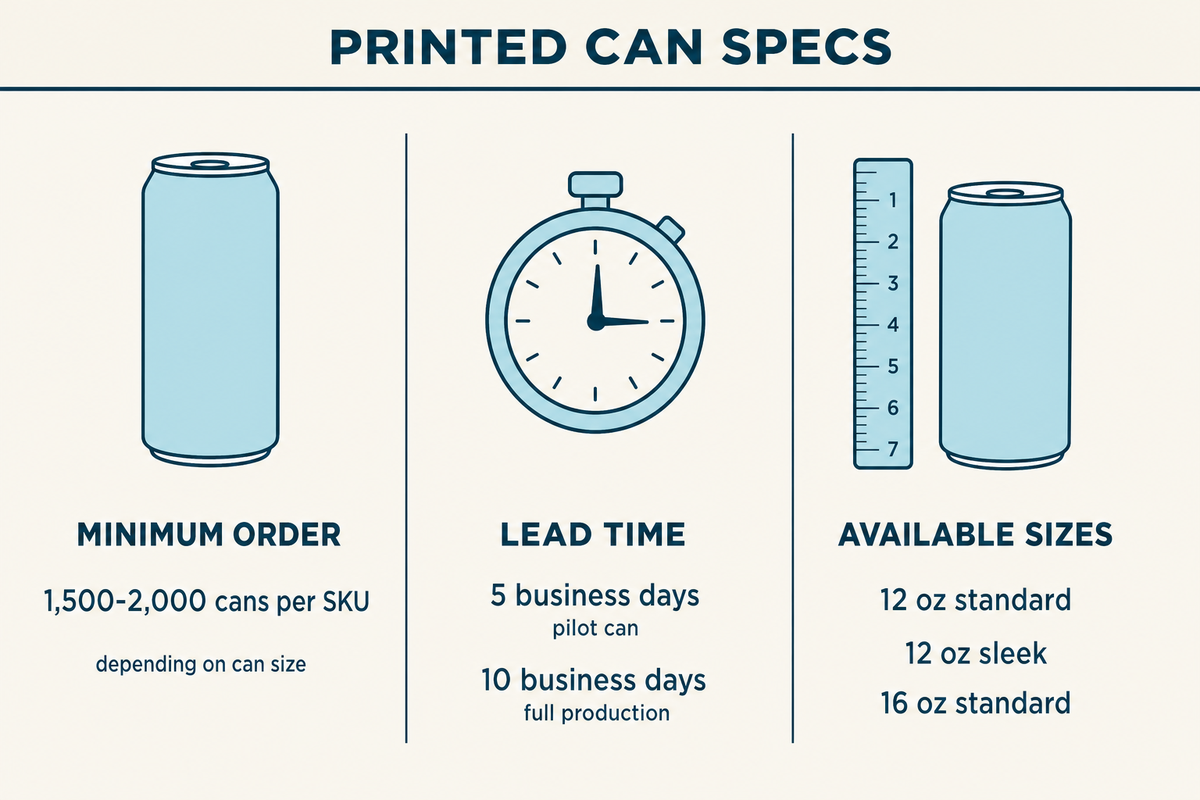
Printed Can Minimums, and Lead Times

Here’s what the actual minimums and timelines look like:

Minimum order ~1,500-2,000 cans per SKU depending on can size
Lead time 5 business days for pilot can, 10 business days for full production
Available sizes 12oz standard, 12oz sleek, 16oz standard


Printed can specifications

For context: Ball Corporation’s minimum for traditional printed cans is 5 truckloads per SKU, which works out to over 1 million cans. That’s more than most craft breweries produce in a year. Digital printing brings that minimum down by roughly 500x.

Something to consider: Compare the per-can cost to what you’re paying now for brites plus labels plus the labor to apply them (possibly even a label converter).

When Printed Cans Make Sense for a Brewery

Not every beer in your lineup needs a printed can. Here’s how we see breweries typically think about it:

Flagships and year-round beers: Your core lineup, the 3-4 beers that sell consistently. The designs are locked in, the volume is predictable, and these are the beers showing up on retail shelves next to nationally distributed brands. Printed cans make the most sense here.

Growing into distribution: If you’re moving beyond the taproom into larger retailers, distributors start caring about shelf presentation.

The mixed strategy: Most breweries don’t go all-in on printed cans overnight. They use printed cans for their core lineup and keep labels for seasonal releases, collaborations, and one-offs where they need lower minimums and faster design changes. That flexibility is one of the reasons digital works well for craft. You don’t have to choose one or the other.

Not sure if your brewery is at the right stage? Our post on when your brand is ready for printed cans walks through the specific signals to look for.

Available Finishes for Digitally Printed Cans

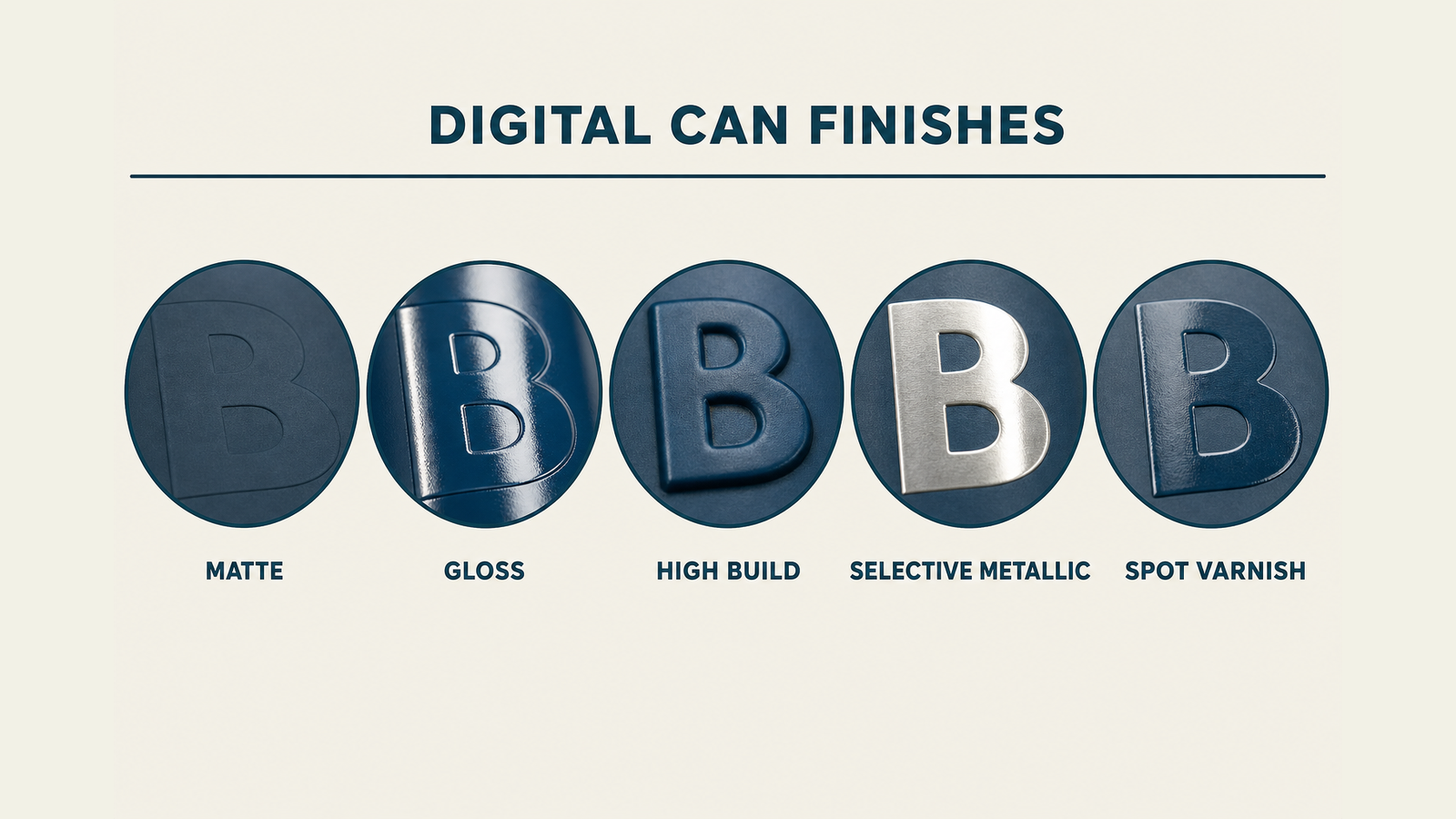
Digital can printing offers finishes that used to be reserved for the big brands:

  • Matte for that soft, premium look (we see this a lot on hazy IPAs and NEIPAs)
  • Gloss for a clean, bright look (popular for lagers, pilsners, and lighter styles)
  • High build (emboss) for a raised, tactile effect you can feel when you pick up the can
  • Selective metallic where the bare aluminum shows through your design, creating a natural metallic look without any additional printing layer
  • Spot varnish applied to specific design elements for contrast (gloss logo on a matte background, for example)

Printed can finishes

Your designer will need to think about how artwork translates to a curved surface. Fine text needs to be 7pt or larger, barcodes work best in vertical orientation, and the areas near the top and bottom of the can have different curvature. Our guide to designing for printed cans covers the full spec.

Pilot Cans Let You Test Printed Cans Before Committing

The biggest risk in switching to printed cans is ordering thousands of cans and finding out the colors appear different than on your computer screen or the design doesn’t look right on a curved surface.

That’s why every new design starts with a pilot can. It’s a physical prototype printed on an actual can. You hold it, check the colors against your brand standards, and show it to your team before any production run begins.

Why Printed Cans Are the Most Recyclable Packaging Option

A printed can is just aluminum and ink. No label material, no adhesive, no plastic sleeve.

Aluminum is one of the most recycled materials on the planet. Printed cans go straight into the recycling stream without any separation step. Shrink sleeves, on the other hand, typically have to be removed before the aluminum can be recycled. In practice, most consumers don’t do that, which means sleeved cans often get rejected at recycling facilities.

If your brewery cares about sustainability (and your customers probably do), printed cans are the cleanest option.

Want to See Your Flagship on a Printed Can?

We’ve worked with over 1,500 breweries, so we’ve seen just about every setup. Whether you’re running 2,000 cans of your flagship or testing a new design for a seasonal release, the easiest way to start is with a pilot can.

Check out our printed cans page or request a quote and we’ll walk you through the details for your specific lineup.

The Craft Beverage Brand’s Guide to Labels & Packaging

If you make beer, hard seltzer, canned wine, kombucha, cold brew, RTDs, or non-alcoholic drinks, you know how important packaging is. By the time someone reaches for your can or bottle, they’ve already decided it looks like something worth trying. That decision happens fast, and it happens almost entirely on the strength of how the package looks and feels.

This guide is built for craft beverage brands trying to make smart packaging decisions. We walk through format choices, materials, finishes, minimum quantities, lead times, compliance basics, and the mistakes we see new brands make most often.

We have spent years working with breweries, distilleries, kombucha makers, and emerging beverage brands of every shape, so our goal here is to flatten the learning curve so you can get to a label or a printed can you feel great about.

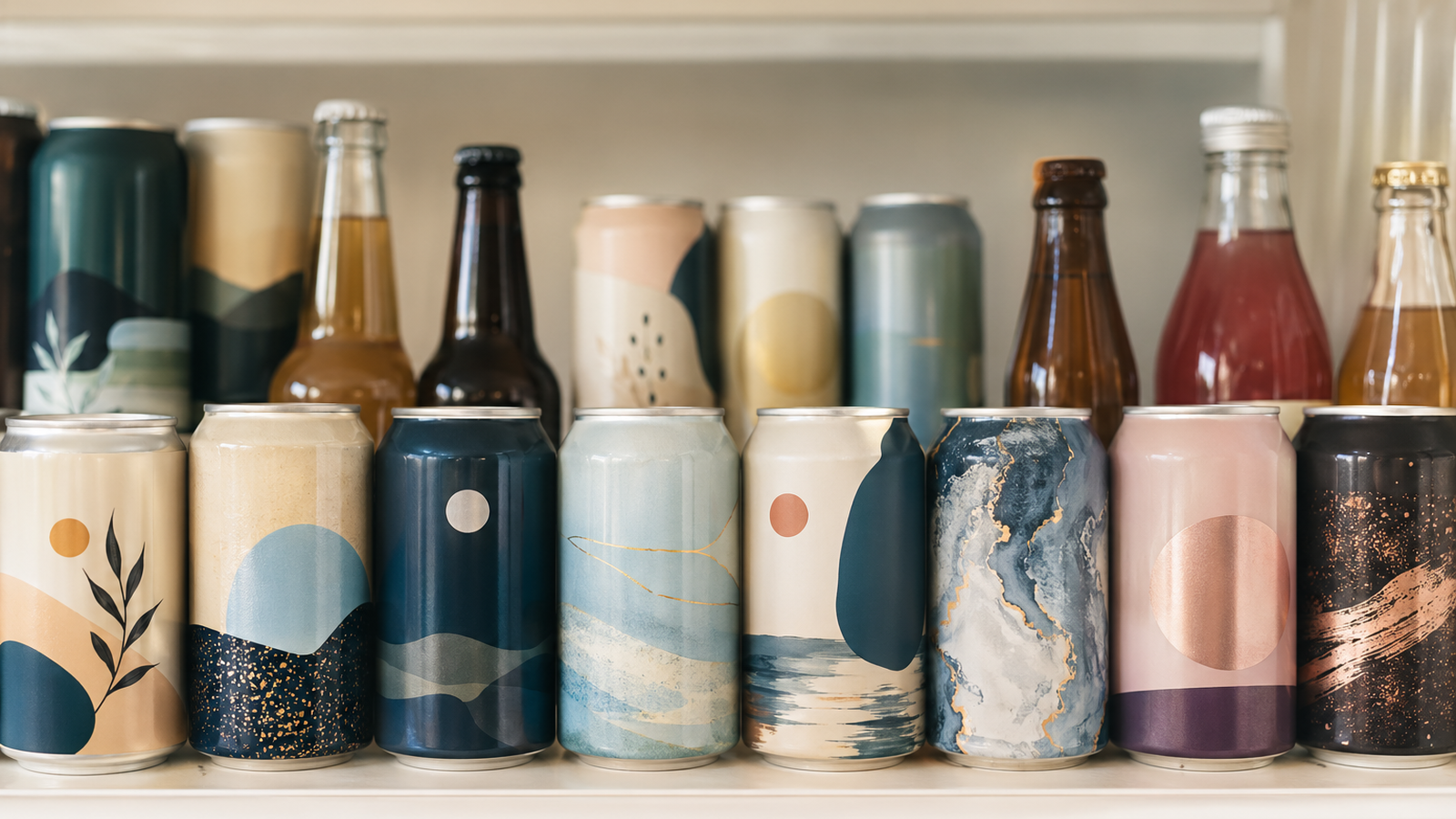
Beverage cans and bottles with labels, shrink sleeves, and direct-to-can printing

Why the Label Decision Decides So Much for a Craft Beverage Brand

There is a saying in craft beverage circles that packaging is your brand’s dating profile. It is the first thing a stranger sees, and a lot of strangers never get past it. That feels dramatic until you spend time at a store watching people decide what to buy.

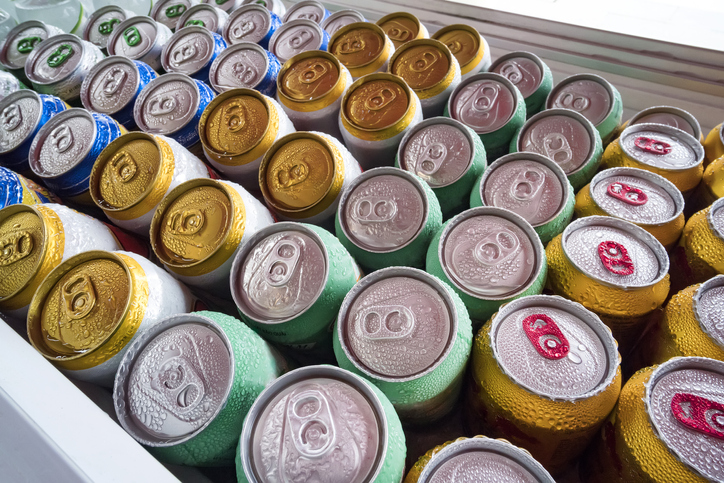
There are more than 9,000 craft breweries in the United States according to the Brewers Association, and the rest of the cooler is now packed with canned wine, hard seltzer, kombucha, cold brew, and a fast-growing field of non-alcoholic brands.

That’s why we treat the decoration layer as the most important packaging decision a craft beverage brand makes.

The Three Main Ways to Decorate a Craft Beverage Can or Bottle

Most craft beverage brands end up choosing between three formats:

  1. pressure-sensitive labels (often just called can labels or bottle labels)
  2. shrink sleeves
  3. printed cans

Each one fits some scenarios better than others.

Pressure-Sensitive Labels

Pressure-sensitive labels are the most common choice for most craft beverage brands. The label is printed on a flexible material, cut to the right shape, and applied to the can or bottle with an adhesive.

Pressure-sensitive labels go on cans, bottles, growlers, and crowlers. They print in just about any finish you can think of, including matte, gloss, foil, embossing, and soft touch.

The reason most breweries and emerging beverage brands start here is simple: digital pressure-sensitive label printing has very low or no minimums, fast turnaround, and lets you run multiple SKUs in a single production run without setup penalties.

That means you can run 1,000 labels of a porter, 3,000 of an IPA, and 2,000 of a pilsner in the same order if you want to.

Shrink Sleeves

Shrink sleeves are printed on a flexible plastic film that wraps around the entire can or bottle and is then heat-shrunk to fit. They cover the full surface, letting your design wrap continuously around the package without a seam. They look great on shelf, especially for hard seltzers, RTDs, and any brand whose design is built around bold, photo-realistic, full-body artwork.

The application process can introduce distortion at the can shoulders if the artwork isn’t laid out for it. And per-unit cost is usually higher than a comparable pressure-sensitive label.

Printed Cans

Printed cans skip the label entirely. The artwork is printed directly onto the aluminum can using a digital printing process called direct-to-object, sometimes called direct-to-can. There is no label, no adhesive, no shrink film. What you see is ink cured onto the can.

Printed cans look the most premium of the three formats because there is no label edge or sleeve seam. Finishes like matte, gloss, embossed (high build), selective metallic effects, and spot varnish all work.

The minimums for digital printed cans have come way down over the past few years. A typical small-run on a 12oz standard can is in the 1,900 to 2,000 cans per SKU range, which is much more accessible than the old offset-printed-can world. (We will get to that in the minimums section.)

Quick Comparison of the Three Formats

Format Best fit Typical MOQ per SKU Strengths Considerations
Pressure-sensitive labels Most craft brands, multi-SKU lineups, small batches Often no minimum on digital Cheapest at small volumes, fast, every finish, easy SKU mixing Material and adhesive must match the environment
Shrink sleeves Full-body artwork, mixed lines on shared blank cans Often no minimum on digital 360-degree design, same blank can across SKUs Shoulder distortion if artwork is wrong
Printed cans (digital DTO) Brands ready to scale a SKU, premium look without label edges ~1,600–2,000  Most premium look, selective metallic, no label issues Higher MOQ than PS labels, requires a pilot can step


If you want a deeper comparison of cost, lead time, and performance across all three, we wrote a full breakdown in Printed Cans: How to Compare with Shrink Sleeves and Labels.

Picking Label Materials That Survive Coolers, Ice, and Condensation

One of the most common issues we hear from craft beverage brands unhappy with their current printer is some version of “our labels are coming off.”

Almost every time, the root cause is a material or adhesive choice that did not match the environment the can or bottle actually lives in.

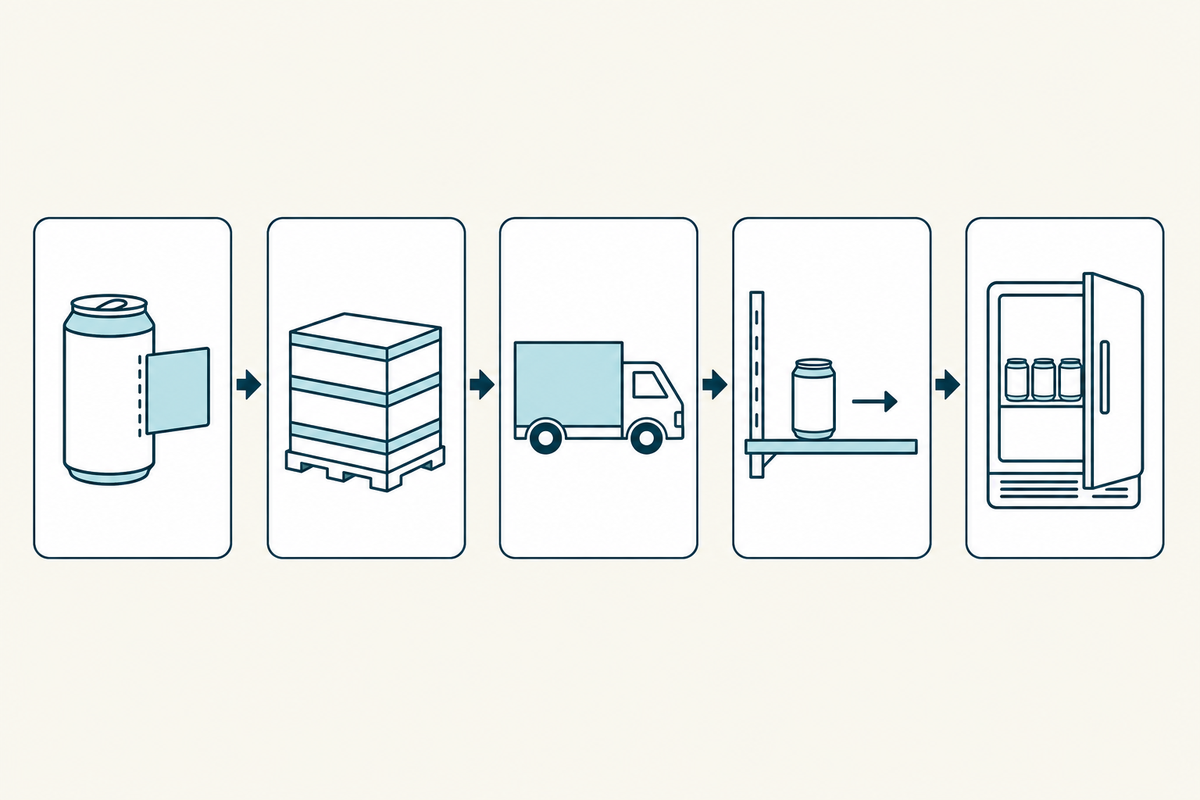
Craft beverage packaging goes through a lot of handling and environments. It sits in coolers, gets buried in ice, comes out covered in condensation, and rides around in delivery trucks. The label has to survive all of that and still look like the brand promised.

Illustration of the environments beverages exist in

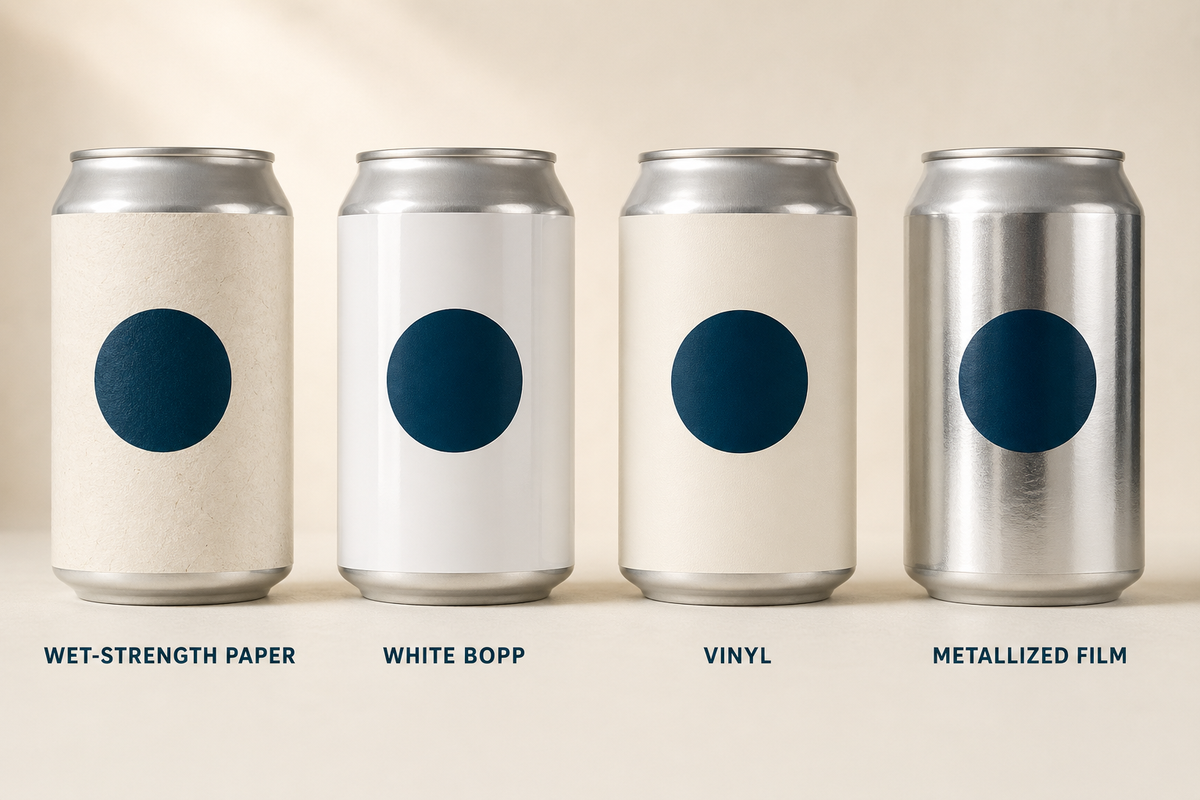
There are a handful of label face materials that do most of the work in our world.

Paper Labels

Paper labels look great and have a craft, hand-made feel. Standard paper falls apart fast in cold and wet conditions, which is why most beverage brands either skip paper entirely or use a wet-strength paper.

Wet-strength paper is treated so it does not break down from condensation or light moisture, which is what you want if you are committed to a paper aesthetic.

BOPP

BOPP is the workhorse film material. It stands for biaxially-oriented polypropylene, which is a fancy way of saying a thin, durable plastic film that does not soak up moisture. White BOPP and clear BOPP are the two common versions. They are water-resistant, tear-resistant, and they hold up to ice baths, cooler doors, and damp delivery trucks without complaining.

Vinyl

Vinyl is similar to BOPP in durability but tends to feel slightly heavier. It is fine for beverage applications, especially when paired with certain finishes, though it costs a bit more.

Metallized Film

Metallized films give you a silver mirror surface to print on. They are not just for decorative effect. The metallic underlayer changes how colors read and lets the label do things paper or BOPP cannot. They cost more than standard films and they are worth considering for premium positioning, especially in spirits and canned wine.

Material options for beverage can labels and packaging

The other half of the durability question is the adhesive. The face material can be perfect, but if the adhesive is not made for cold or wet application, you will still get peeling.

Permanent adhesives rated for refrigerated and frozen surfaces are a different formula from standard ones. If your can is going straight from a 38-degree cold room to a 38-degree cooler, your printer should be specifying an adhesive built for that.

One thing to watch: A lot of label issues are actually material-environment mismatches. Always ask your printer whether the materials are matched to your real-world conditions (think cooler doors, ice buckets, cold trucks, wet hands). A good printer will know the answer.

Finishes That Make a Craft Beverage Label Look Like It Belongs on a Real Brand

If material is the durability decision, finish is the personality decision. Finish is what makes a label feel premium, vintage, modern, hand-drawn, foil-stamped, or any of the other things craft brands are trying to be.

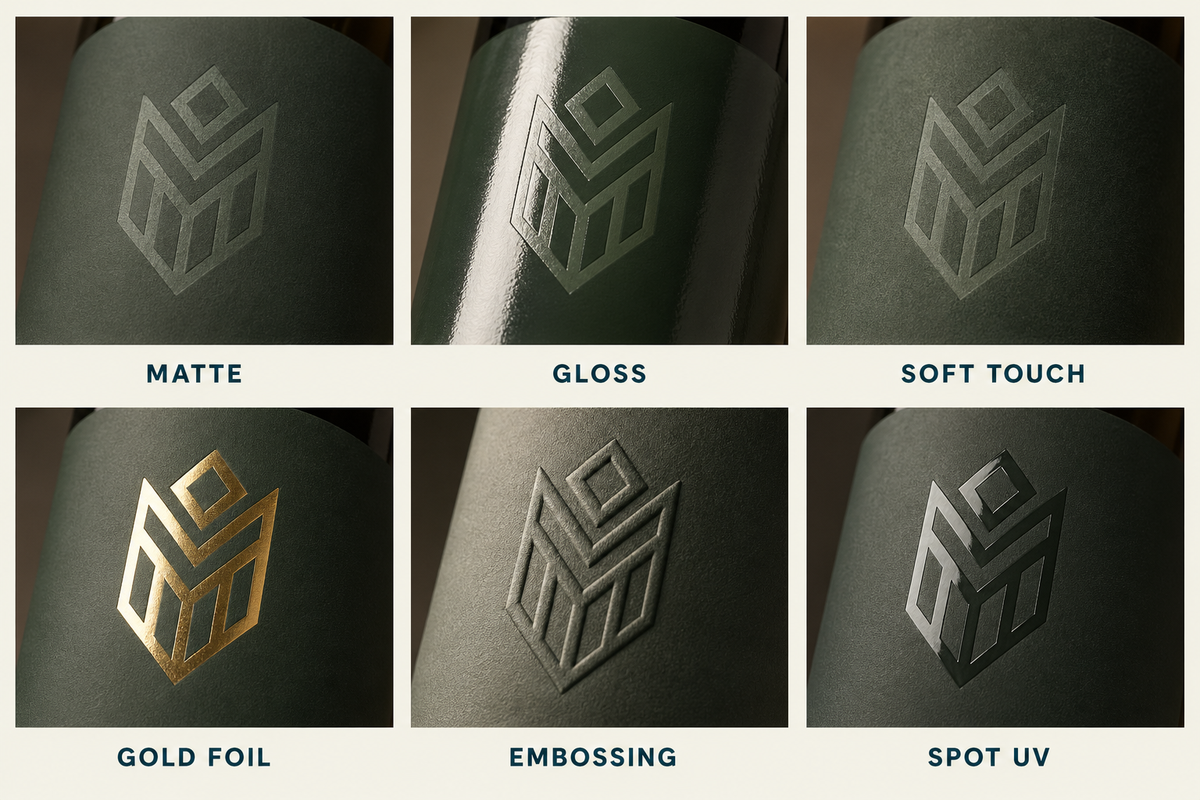
Finishes for beverage labels—matte, gloss, soft touch, foil, embossing, spot UV

Matte and Soft Touch (The Premium Default)

Matte finishes have become the default for craft brands that want to feel modern and intentional without going maximalist. Matte films absorb light instead of reflecting it, which makes designs read as quieter, more confident, and less “shouting on shelf.”

Soft touch is matte’s velvety cousin. The finish has a slight grip to it that changes how the can feels in someone’s hand, which is something gloss cannot do. Soft touch tends to cost more than standard matte and shows up most often on premium positioning where the brand wants the can to feel like part of the experience.

Matte is a strong default for craft beer cans, hard seltzer, kombucha, cold brew, and non-alcoholic beverages going for a clean, modern look. Soft touch shows up on canned wine, premium hard seltzer, and high-end non-alc.

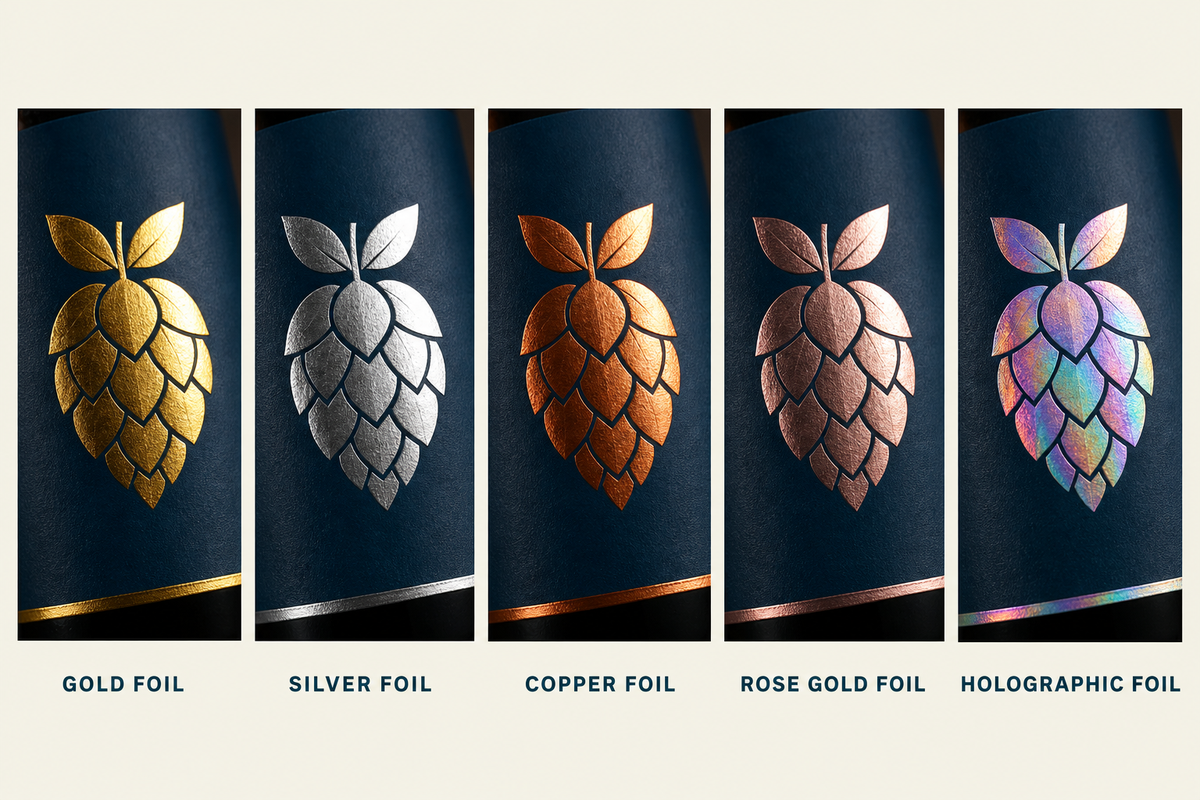
Foil and Metallic Inks

Foil stamping is a separate decoration step where a thin metallic foil is applied to specific parts of the design. Gold and silver are the classics, though copper, rose gold, and holographic foils all exist.

Wineries and distilleries have used foil for decades because it reads as luxury. Breweries used to skip it because it added a step and a cost, but more breweries are using it now for flagship beers and limited releases where the price-per-can supports it.

Foil and Metallic Inks for beverage labels and packaging

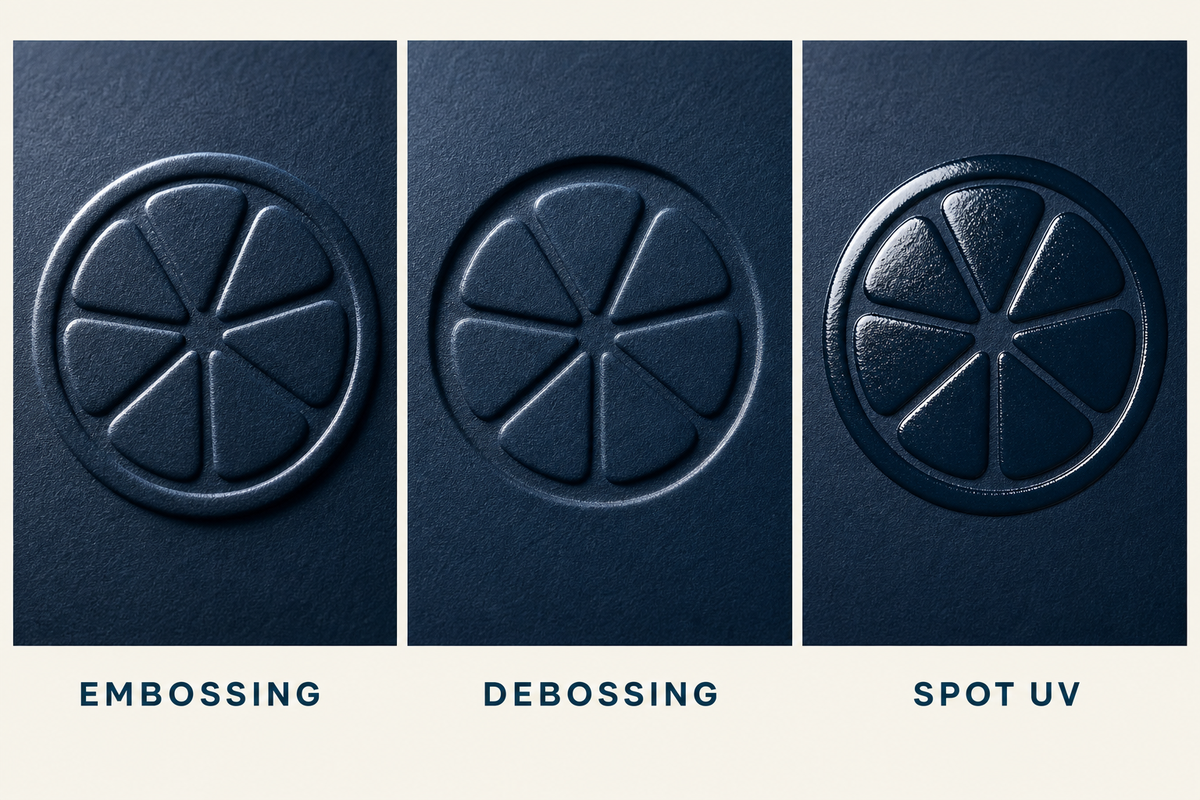
Embossing, Debossing, and Spot UV

Embossing raises a portion of the label off the surface.

Debossing presses it down.

Spot UV applies a glossy coating to specific shapes within an otherwise matte design, which gives a contrast you can feel.

Embossing, debossing, and spot UV on beverage labels

These are the finishes that turn a label into something a customer can run a thumb across. They are most common on wineries, distilleries, and premium beverage launches, but they also show up on flagship craft beers and limited-release hard seltzer.

Also worth noting: Finishes do extra work outside the cooler. A label with foil, embossing, or selective metallic photographs better on social media than a flat label, which means your customer is more likely to share it.

Some of the strongest organic marketing a craft brand gets is people posting cans they thought looked cool. Your finish choice is partly a content strategy.

How Minimum Order Quantities Work for Craft Beverage Labels and Printed Cans

You’re wondering: “What’s a realistic minimum on printed cans?” The answer changed a lot in the past few years, and most online content is still using outdated numbers.

The Old World: Why Printed Cans Used to Be Out of Reach

Until recently, the only way to get printed cans was through traditional offset (or “offset litho”) printing. That process required physical printing plates per design, which meant the economics did not work below very large volumes. Ball Corporation’s well-known move to a five-truckloads-per-SKU minimum, somewhere in the 250,000-can range, priced most craft brands out of printed cans entirely.

That left two options: print pressure-sensitive labels or use shrink sleeves. Both work, and both are still the right answer for plenty of brands. But for any brand that wanted the look of a printed can without warehousing five truckloads of inventory, the barrier to entry was too high.

The New World: Digital Direct-to-Object Printing

Digital direct-to-object printing changed the math. The artwork is printed directly onto the can using a UV-cured inkjet process, with no plates. Because there are no plates, there is no plate cost, which means smaller runs become economical.

Typical minimums on digitally printed cans now look more like this:

  • 12oz standard cans: around 1,945 per SKU
  • 12oz sleek cans: around 2,024 per SKU
  • 16oz standard cans: around 1,556 per SKU

These are real ranges, and smaller quantities can sometimes be accommodated as a special request. The point is that printed cans are now a legitimate option for a brewery doing 1,500 to 2,000 cans of a release, not just global beverage brands.

Realistic Minimums for Pressure-Sensitive Labels and Shrink Sleeves

For pressure-sensitive labels printed digitally, no-minimum and very-low-minimum runs are normal. We’re able to run 250-label and 500-label orders for small breweries or brands testing new SKUs. There’s no plate cost and no setup costs for splitting a run.

Shrink sleeves are different and also have to be seamed which means most printers will want a 5,000 to 7,000 minimum per SKU before the math works for them. We’re different from most printers and don’t have an MOQ on shrink sleeves. 

Realistic Turnaround Times

Speed is the second-biggest anxiety we hear about, after minimums. “How fast can you turn this around?” shows up in nearly every quote request that comes in. And it makes sense. The quicker you’re able to get your packaging, the quicker your beverage can hit the shelves.

So here’s the honest reality:

  • Pressure-sensitive labels (digital): roughly five business days for production once your artwork is approved..
  • Printed cans (digital direct-to-object): about five business days from digital proof approval to a physical pilot can, then about ten business days production after pilot can approval. So a fresh design from artwork to filled cans is roughly three weeks if everything goes smoothly.
  • Shrink sleeves: comparable to pressure sensitive labels for the print, plus the application step, which depends on whether you are sleeving in-house or using a co-packer.

Those numbers assume your artwork is print-ready.

The most common causes of delays that we see:

  1. Artwork that is not actually print-ready. Files in RGB instead of CMYK, no bleed, low-resolution images, missing fonts, or dielines that do not match the can or bottle size.
  2. Color decisions made off a screen instead of a physical proof. What looks like a deep maroon on a laptop is often a brick red on a printed can. The fix is a printed proof or a pilot can, not another screen comparison.
  3. TTB COLA approval running behind schedule. Beer COLAs are usually quick, spirit and wine COLAs less so. Plan around the regulatory step.
  4. Late changes to the SKU lineup. Adding a fourth SKU after the first three are in production turns a one-week project into a three-week project.

TTB, COLA, and FDA: The Compliance Basics by Beverage Category

Compliance is the cheapest part of any project to get right and the most expensive to get wrong. Here is the short version by category.

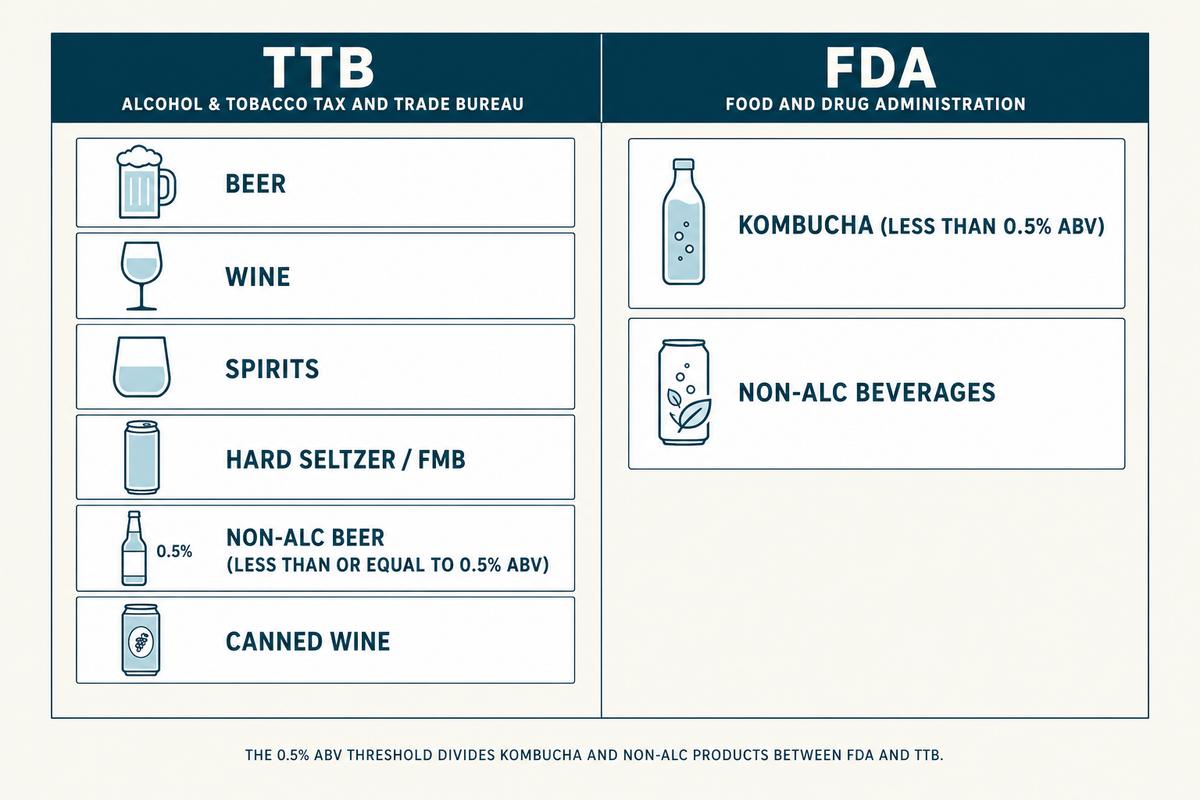
Beverage can compliance table for TTB and FDA

Beer Compliance

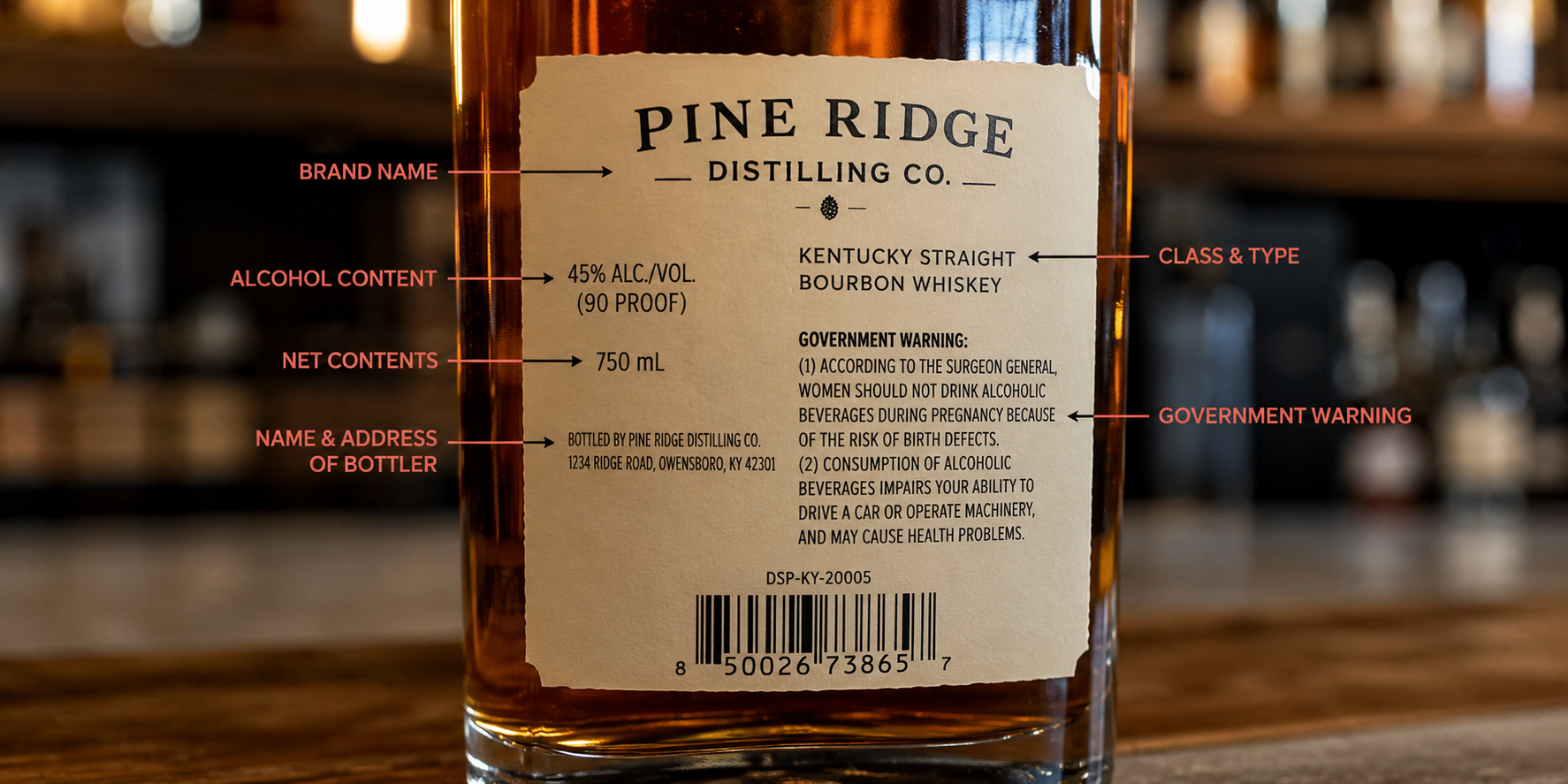
Regulated by the Alcohol and Tobacco Tax and Trade Bureau (TTB). There are eight specific elements that must appear on a beer label. We covered them in detail in our guide to TTB Beer Label Requirements, so we will not duplicate it here. The thing to know is that the TTB cares about exactness. A missing comma can fail a COLA.

Wine Compliance

TTB-regulated, COLA process is more involved than beer, with vintage, varietal, appellation, and other label elements that have their own rules. If you are launching a wine brand or running a new vintage, build TTB review time into your timeline. Our Spirits Label Printing page has more detail on the spirits-and-wine compliance side.

Spirits Compliance

TTB-regulated, similar to wine. The COLA process is involved and the label content has tighter rules than beer.

Hard Seltzer Compliance

Where it lives depends on the base. Flavored malt beverages are TTB-regulated like beer. Spirit-based seltzers fall under the spirits side. Read the regulatory category before you spec the label.

Kombucha Compliance

Regulated by the FDA under 0.5% alcohol by volume, TTB-regulated above. The watch-out with kombucha is live ABV testing. A kombucha that ferments in the can past 0.5% becomes a TTB problem fast.

Non-alcoholic Beer Compliance

TTB has its own rules for malt beverages at or below 0.5% ABV. We wrote about it specifically in Dos and Don’ts for Non-Alcoholic Beer Labels because it catches new brands by surprise.

Canned Wine Compliance

TTB COLA still applies. The can format does not change the rules.

The Most Common First-Time Mistakes Craft Beverage Brands Make with Labels

Most of the painful, expensive label experiences we see come down to a small number of repeatable mistakes. Knowing about them in advance is most of the fix.

  • Designing in RGB and hoping it prints. RGB lives on screens and CMYK lives on print, so design in CMYK from the start and settle color on a physical proof rather than a monitor.
  • Skipping the proof or pilot can. The proof or pilot can is the cheapest insurance you can buy, and brands that skip it are the brands that end up reprinting.
  • Over-ordering to hit a per-unit price. Buying twelve months of a SKU you have not validated is almost always more expensive than buying two months and reordering once you know it sells.
  • Choosing the wrong material for the environment the can lives in. If your can lives in ice buckets and cold trucks, you need a film face and an adhesive rated for cold and wet, so match the spec to the real conditions.

How to Brief a Label Printer

A brief saves everyone time and money. It doesn’t have to be formal, but having the right information and files makes the entire process (quoting, ordering, delivery) smoother.

A brief includes:

  • Artwork in print-ready format. PDF or AI files, in CMYK, with bleed, with fonts outlined or included. If you do not know what print-ready means, your designer should.
  • The dieline. This is the template that defines the exact size, shape, and unwind of the label or sleeve. The printer can supply one for any standard product.
  • Format choice. Pressure-sensitive label, shrink sleeve, or printed can.
  • Material and finish. Or a description of the look and the environment, so the printer can recommend a material.
  • Quantity per SKU. And whether you want to split SKUs across one production run.
  • Deadline. Including any hard date driven by a release, an event, or a retail commitment.
  • Distribution and use context. Cooler, shelf, ice bath, taproom, retail, DTC. The environment shapes the spec.

What you should ask the printer in return:

  • What is your minimum order quantity for this format?
  • What is your real turnaround time once artwork is approved?
  • Do you provide a physical proof or pilot can before production?
  • How do you handle color matching across runs?
  • What happens if there is a print issue on the order?
  • Who is my point of contact, and is it the same person from quote through delivery?
  • Are there setup fees, plate fees, or overage charges I need to know about?

Here’s a little secret: A real partner will sometimes tell you not to do something. Not because they do not want the order, but because they have seen the version of the project you are about to start three times before, and they know how it ends. That’s the kind of conversation worth paying for.

What’s Next

Want to talk about your project? We’re happy to walk through the specifics. We have done this with hundreds of breweries, distilleries, kombucha brands, and beverage companies, and most of the value is in the conversation that happens before anyone places an order.

This guide is the high-level overview. If you want to dig into a specific topic, we have written dedicated pieces on the parts that need more depth:

What Is a Co-Packer and How Do You Find the Right One?

⚞ The Highlights:

  • A co-packer (short for contract packager) packages your product for retail so you can focus on making it. Some co-packers also manufacture the product for you, which makes them a contract manufacturer.
  • The right co-packer depends on your product type, your volume, the certifications your category requires, and how much of the process you want to hand off.
  • Vet candidates on capacity, quality certifications (SQF, BRC, GMP), relevant experience, minimum orders, and lead times. Then start with a small trial run before you commit.
  • Expect per-unit or per-case pricing plus setup fees and minimum order quantities. Get all of it in writing up front so the quote is the number you actually pay.
  • One detail brands miss: your co-packer’s labeling line has specific requirements for how your labels are made and rolled. Getting the label spec right is the difference between a smooth run and a jammed line.

A co-packer, short for contract packager, is a company that packages your product for retail so you don’t have to. You hand off the filling, labeling, assembly, and packing, and you get back finished product that’s ready for the shelf. The term is often used interchangeably with contract packager, and when a co-packer also makes the product for you, people call it a contract manufacturer or co-manufacturer.

For a growing brand, a co-packer is usually the answer to a simple problem: demand has outrun what you can package by hand. We work with dozens of co-packers to print the labels that go on their lines, so we see both sides of this relationship every week. Below is what a co-packer does, how to find one that fits your product, what to expect on cost, and a label detail that trips up more brands than it should.

What is a co-packer?

A co-packer is a third-party company that packages your product to your exact specifications. That can mean filling bottles, applying labels, assembling multipacks, or boxing finished goods for distribution. The core idea is that you own the product and the brand, and the co-packer owns the equipment, the labor, and the packaging know-how to get it retail-ready at volume.

What does a co-packer actually do?

Most co-packers handle some or all of these jobs:

  • Filling. Putting your product into its container, whether that’s liquid into bottles and cans, powder into pouches, or dry goods into jars.
  • Labeling. Applying labels, shrink sleeves, or other decoration to the container on automated lines.
  • Assembly and kitting. Building variety packs, gift sets, subscription boxes, or promotional bundles.
  • Case packing. Boxing finished units and palletizing them for shipping to retailers or distributors.
  • Sourcing. Some co-packers buy your packaging materials for you, from containers to closures to labels.

The scope varies a lot from one co-packer to the next. Some only handle the packing step after your product is made. Others run the whole process from raw ingredients to a palletized finished product, which is sometimes called a turnkey or full-service operation.

Bottles being packaged

Co-packer vs. contract manufacturer vs. private label

These three terms get mixed up constantly, and the difference comes down to who makes the product and who owns the recipe. Here’s a quick way to keep them straight.

Co-Packer (Contract Packager) Contract Manufacturer (Co-Man) Private Label
What they do Package a product you already made Make and package your product to your formula Make their own product for you to brand
Who owns the recipe You do You do The manufacturer does
Best for Brands that make the product but can’t package at scale Brands with a recipe but no production capacity Brands that want a ready-made product fast
Typical scope Filling, labeling, assembly, case packing Production plus packaging (turnkey) Their recipe, your label

In practice, the lines blur. A single company may offer all three, and a full-service co-packer often does light manufacturing too. The label you put on the product is yours in every case, which is where we usually enter the picture.

What kinds of products use co-packers?

Co-packers work across food, beverage, supplements, personal care, household goods, pet products, and more. Any brand that sells a physical product in volume is a candidate. Think of a hot sauce maker filling and labeling bottles, a kombucha brand canning at scale, a supplement company filling capsule bottles, or a coffee roaster bagging and sealing. Once hand-packing stops keeping up, a co-packer takes over.

Why work with a co-packer?

Most brands bring in a co-packer for one reason: it frees you to focus on the product and the brand. Someone with the right equipment handles the packaging at a speed and scale you can’t match by hand. That trade has real benefits, and a few honest trade-offs worth knowing before you sign anything.

What are the benefits of using a co-packer?

  • Lower cost at volume. Co-packers buy materials in bulk and run efficient lines, so per-unit packaging cost usually drops compared to doing it yourself.
  • Speed and capacity. An automated line packs in an hour what a small team packs in a day, which matters when you’re chasing a retail launch or a seasonal window.
  • Room to scale. You can add SKUs or grow volume without buying equipment, leasing space, or hiring a packaging crew.
  • Compliance help. Experienced co-packers know the food-safety and labeling rules for your category and build them into the process.
  • Fewer headaches. Sourcing, quality checks, and logistics move off your plate and onto a partner who does this all day.

What are the trade-offs to know going in?

A co-packer is a partner, not a magic button. Handing off packaging means handing off some control, so go in with eyes open:

  • Minimum order quantities. Many co-packers set minimums that can feel steep for an early brand. Ask early so there are no surprises.
  • Less hands-on control. You’re trusting someone else with quality and timing, which makes clear specs and good communication essential.
  • Lead times. Your product now sits in someone else’s production schedule. Plan releases around their calendar, not just yours.
  • Setup and change costs. New projects and design changes can carry setup fees. Worth knowing before you iterate on packaging.

Worth knowing: The most common co-packer complaint we hear from brands isn’t price. It’s surprises, like a minimum they didn’t expect or a label that jammed the line on day one. Almost all of it is avoidable with clear specs and a trial run before the full production commitment.

Do you need a co-packer, or a contract manufacturer?

Ask one question: do you already make the product? If you make it and just need help packaging at scale, you want a co-packer. If you have a recipe but no way to produce it, you want a contract manufacturer (co-man) that handles both making and packing. Plenty of brands start with a co-man for production, then keep the same partner for packaging, which is why the roles overlap so often.


Working with a co-packer and need labels that run clean on their line?

We print labels for dozens of co-packers and can match your labels to their applicator specs, so your run doesn’t stall on day one.

Request a Quote Get a Sample Pack


How to find the right co-packer

Finding a co-packer takes a mix of directory research, industry networking, and old-fashioned reference-checking. Most co-packers do very little marketing of their own, so the good ones can be surprisingly hard to surface with a plain Google search. Here’s where to look and how to sort the fit from the rest.

Where do you find a co-packer?

  • Industry directories and associations. The Contract Packaging Association keeps a member directory and a request-for-quote tool. Thomasnet lists thousands of co-packing and contract-packaging suppliers you can filter by location and certification.
  • Matching platforms. Services like PartnerSlate connect brands with co-packers and co-manufacturers by product type and requirements.
  • Category-specific resources. Beverage brands often start with BevNET’s co-packing listings; specialty food brands use specialty-food co-packer directories.
  • Trade shows. Events like PACK EXPO and ProPak put a lot of co-packers in one room, which is one of the fastest ways to compare capabilities in person.
  • Word of mouth. Your peers are the best filter. Ask other founders in your category who they use and, just as usefully, who they’ve left.

What should you look for when vetting a co-packer?

Once you have a shortlist, weigh each candidate against the things that predict a good run:

  • Capacity. Can they scale with you without dropping quality? A facility tour tells you a lot about how they handle peak season.
  • Quality assurance. Look for documented quality-control processes and real certifications, not just a claim on the website.
  • Relevant experience. A co-packer that already runs products like yours will hit fewer surprises. Beverage, food, and supplement lines each have their own quirks.
  • Flexibility. Understand their lead times, minimums, and how they handle a rush or a last-minute change.
  • Communication. You want a partner who answers the phone and flags problems early. This is the single biggest driver of whether the relationship lasts.

Which certifications matter?

The certifications you need depend on your category, but these are the ones that come up most often:

  • SQF, BRC, or FSSC 22000. Globally recognized food-safety standards. Retailers frequently require one before they’ll stock a product.
  • GMP and HACCP. Good Manufacturing Practices and hazard-analysis systems that show a co-packer runs a clean, disciplined operation.
  • FDA facility registration. Required for food and beverage co-packers in the U.S., and a quick thing to verify in the FDA database.
  • Organic, Non-GMO, or kosher. Product-specific certifications you’ll need if those claims appear on your label.

Quick note: If a claim like “organic” or “non-GMO” is going on your label, your co-packer needs the matching certification to back it up. A label claim your packing facility can’t support is a compliance problem waiting to happen.

What questions should you ask before you commit?

Before you sign, get clear answers on the things that turn into disputes later:

  • What’s your minimum order quantity, and can it be split across SKUs?
  • What’s your typical lead time from approved artwork to finished product?
  • Do you source packaging and labels, or do I supply them?
  • What are your setup fees, and what triggers a new one?
  • Can I visit the facility and see a run in progress?
  • Can you share references from brands in my category?

How much does a co-packer cost?

There’s no single price for co-packing. Most co-packers charge per unit or per case, and some charge by production weight or volume, with setup fees for new projects on top. The variables that move your number are run size (bigger runs lower the per-unit cost), product complexity, packaging format, and how much sourcing you hand off. Get a detailed, itemized quote up front so you can compare partners on total landed cost, not just the headline rate.

Why should you start with a trial run?

A trial run is the cheapest insurance you can buy. Before you commit to a long-term agreement or a large volume, run a small batch. It tests their quality control, their communication, and whether your packaging runs cleanly on their equipment. A trial run is also where label problems show up while they’re still cheap to fix, which is where the label handoff comes in.

The label handoff most brands overlook

Here’s the detail that causes more day-one delays than almost anything else: your labels have to be built for your co-packer’s specific labeling line, not just for the container. A label that looks perfect as a proof can still jam an automated applicator if the roll is wound the wrong way or the core is the wrong size. Because we print labels for dozens of co-packers, we see this happen, and it’s almost always preventable.

Who supplies the labels, you or the co-packer?

It goes both ways. Some co-packers source and print labels for you as part of the job. Many others ask you to supply your own labels to their spec, which gives you control over quality and finish but puts the responsibility on you to get the roll format right. Confirm which arrangement you’re in before your first run, because “we assumed you were handling it” is a bad thing to discover on packing day.

What label specs does your co-packer need?

If you’re supplying labels, your co-packer’s line will have requirements for how those labels are manufactured and rolled. The ones that matter most:

  • Unwind direction. Automated applicators need labels wound a specific way (which edge leads, and whether the label faces in or out). Get this wrong and the labels feed upside down or backward.
  • Core size. The cardboard core the label roll is wound on has to fit their equipment, commonly a 3-inch core, but confirm it.
  • Roll diameter. Every applicator has a maximum roll size it can hold. Too big and the roll won’t fit the machine.
  • Label material and adhesive. The material has to suit both the container and the application speed. A label that peels or curls on a fast line will cost you the whole run.
  • Labels per roll and gap. The spacing between labels and the count per roll affect how the line feeds and how often it has to stop for changeovers.

The fix is easy: ask your co-packer for their labeling-line spec sheet before you order labels, and hand it straight to your label printer. If you’d like a primer on one of these, our guide to determining your label unwind position walks through the most common source of confusion.

How do you avoid line jams and delays?

Coordinate the three parties early: you, your co-packer, and your label printer. Share the co-packer’s applicator specs with your printer before the labels are made, run a small proof through the actual line if you can, and confirm barcode placement and scan-readability on the finished container. A little coordination up front is far cheaper than a stopped line and a missed retail date.

Packaging boxes

Making the partnership work

Finding a co-packer is the start. The brands that get the most out of the relationship treat it like a long-term partnership, not a transaction.

How do you transition packaging to a co-packer?

  • Plan ahead. Talk through timelines, expectations, and likely obstacles before anything moves.
  • Manage inventory. Coordinate existing stock so you don’t run out during the switch or get stuck with waste.
  • Start with a pilot. Run initial batches to catch process adjustments before you scale.
  • Document everything. Materials, artwork files, label specs, and assembly instructions all go in writing, backed by a formal co-packing agreement.

How do you keep the relationship healthy?

  • Communicate regularly. Routine check-ins catch small issues before they become reprints or delays.
  • Review performance. Look at what’s working and what isn’t on a set cadence.
  • Revisit terms as you grow. Volume and SKU counts change. Your agreement should keep up.
  • Keep the feedback two-way. The best co-packers will tell you how to make your product run better, and the best brands listen.

Next steps

If you’re getting ready to bring on a co-packer, three things will make your search smoother: get specific about the challenge you’re solving, write down your non-negotiables (certifications, minimums, timelines), and line up your packaging and labels early so nothing stalls on the first run.

And if labels are part of that picture, that’s where we come in. We print labels for brands and for the co-packers who apply them, so we can help you get the material, finish, and roll format right the first time. Take a look at our six questions to ask a digital label printer, or get in touch and we’ll help you sort out the label side of your co-packing setup.

Frequently asked questions

What is a co-packer?

A co-packer, short for contract packager, is a third-party company that packages your product for retail to your exact specifications. That can include filling containers, applying labels, assembling multipacks, and case-packing for distribution. You own the product and the brand; the co-packer provides the equipment, labor, and packaging expertise to get it retail-ready at volume. When a co-packer also makes the product for you, it’s usually called a contract manufacturer or co-manufacturer.

What is the difference between a co-packer and a contract manufacturer?

A co-packer packages a product you have already made. A contract manufacturer (co-man) both makes and packages your product to your formula. In both cases you own the recipe and the brand. Many brands use a contract manufacturer for production and keep the same partner for packaging, which is why the two terms often overlap.

How do you find a co-packer?

Start with industry directories and associations such as the Contract Packaging Association member directory and Thomasnet, use matching platforms like PartnerSlate, check category-specific resources such as BevNET’s co-packing listings for beverages, meet co-packers at trade shows like PACK EXPO, and ask peers in your category who they use. Because most co-packers do little marketing, referrals and directories often surface better options than a plain search.

How much does a co-packer cost?

Co-packers typically charge per unit or per case, sometimes by production weight or volume, with setup fees for new projects. Your cost depends on run size, product complexity, packaging format, and how much sourcing you hand off. Larger runs lower the per-unit cost. Ask for a detailed, itemized quote up front so you can compare partners on total landed cost rather than the headline rate.

What certifications should a co-packer have?

It depends on your category. Food and beverage brands should look for a recognized food-safety certification such as SQF, BRC, or FSSC 22000, plus GMP and HACCP practices and FDA facility registration in the U.S. If your label makes claims like organic, non-GMO, or kosher, your co-packer needs the matching certification to support them.

Do co-packers supply the labels or do I?

It varies. Some co-packers source and print your labels as part of the job, while many ask you to supply your own labels to their specification. If you supply them, your labels must match the co-packer’s labeling-line requirements, including unwind direction, core size, roll diameter, and a material suited to the container and line speed. Confirm the arrangement and get the applicator spec sheet before you order labels.

Why do my labels have to match my co-packer’s line?

Automated labeling equipment has fixed requirements for how a label roll is wound and sized. If the unwind direction, core size, or roll diameter is wrong, labels can feed upside down, jam the applicator, or not fit the machine at all. A label that looks perfect as a proof can still stop a production line, so match the roll format to the co-packer’s spec before the run.

Should I start with a trial run before committing to a co-packer?

Yes. A small trial run tests the co-packer’s quality control, communication, and whether your packaging and labels actually run well on their equipment, all before you commit to a large volume or a long-term agreement. It’s also where label and application issues surface while they’re still inexpensive to fix.

Ready to get your labels co-packer-ready?

If you’re lining up a co-packer, we can make sure the label side goes smoothly. We print for brands and for the co-packers who apply their labels, so we know what a clean run looks like. Request a sample pack to see and feel the materials, or get in touch and we’ll help you match your labels to your co-packer’s line.

Want to get the label details right before your first run? A few of our other guides:

Can You Ship Alcohol? Everything You Need to Know About Shipping Beer, Wine, and Liquor

When it comes to shipping alcohol, it’s important to do so safely, in full compliance with regulations, and in a way that protects the packaging and integrity of your products. In this article, we’ll cover the regulations that you should know and provide advice for keeping your packaging intact from shipping origin to destination.

Understanding Legal Requirements for Shipping Alcohol

Navigating the legal requirements for shipping alcohol can feel overwhelming. It’s complex, yes, but understanding these regulations is crucial for any business in the alcoholic beverage industry.

Alcohol Licenses

Before even thinking about boxing up a bottle or can, know this: you need the right licenses. These aren’t one-size-fits-all; they vary from region to region.

In the United States, you’ll need to consider the following:

  • Federal Licensing: First off, you’ll need a basic permit issued by the Alcohol and Tobacco Tax and Trade Bureau (TTB) to manufacture, wholesale, or import alcoholic beverages.
  • State Licensing: Each state has its own regulations for the sale and shipment of alcohol. You must obtain a license from the alcohol regulatory agency in each state to which you intend to ship. Some states will require a direct shipper’s license while others might require some combination of retail, distributor, and shipping licenses. See a full list of state-by-state alcohol agencies in the U.S.

Because of the complexity and variety of licenses that a manufacturer may need to obtain, many companies exist to help alcohol beverage manufacturers remain compliant, including Sovos, Compliance Service of America, and Avalara, among others.

Beer on pallets

Wholesale vs. Direct-to-Consumer

When considering shipping alcohol, it’s important to distinguish between shipping to stores, bars, and restaurants (wholesale) and shipments to consumers. Here are some key differentiations to consider:

  • Licensing: We covered wholesale licensing considerations above, but when selling direct-to-consumer (DTC), many states require a different shipper’s license and/or permit.
  • Age Verification: DTC shipping requires an age verification process to ensure recipients are of legal drinking age.
  • Volume Limits: Some states may impose limits on the quantity of alcohol that can be shipped directly to a consumer.
  • Labeling and Packaging: When shipping alcohol, there are requirements for labeling and packaging depending on the carrier and the state to which the alcohol is being shipped. We’ll cover this in more detail later in this article.

Alcohol Shipping Agreements

An alcohol shipping agreement is a contract between a distributor or manufacturer of alcohol and a shipping carrier. This agreement outlines the terms under which the carrier will transport products. These agreements typically include the following elements:

  • Scope of services: Types of alcohol that will be transported, where will it be picked up and delivered, delivery timelines, etc.
  • Compliance agreement: Both parties agree to comply with all applicable federal, state, and local laws regarding shipments of alcohol
  • Shipping and packaging requirements: Specifications on how the alcohol must be packaged to minimize damage during transit (including types of materials, labels, and handling instructions)
  • Insurance and liability: Details who is responsible for insuring the alcohol during transit, as well as each party’s liability in case of any issues

An alcohol shipping agreement will also commonly include payment terms, provisions for compliance audits and inspections, conditions for termination and renewal, and terms of confidentiality.

Prohibition & Dry Counties

“Prohibition? Wasn’t that repealed a long time ago??” Yes, but believe it or not, certain counties and local jurisdictions may still have strict regulations or may even prohibit the shipment of alcohol. You can view a list of dry counties in the U.S. here.

Beyond county and local laws, certain states impose limits on the amount of alcohol that can be shipped (particularly to consumers) within a given timeframe.

Choosing the Right Packaging & Shipping Materials

Selecting the right packaging materials for shipping alcohol requires a balance between ensuring the safety and integrity of your products, ensuring compliance, and keeping costs in check.

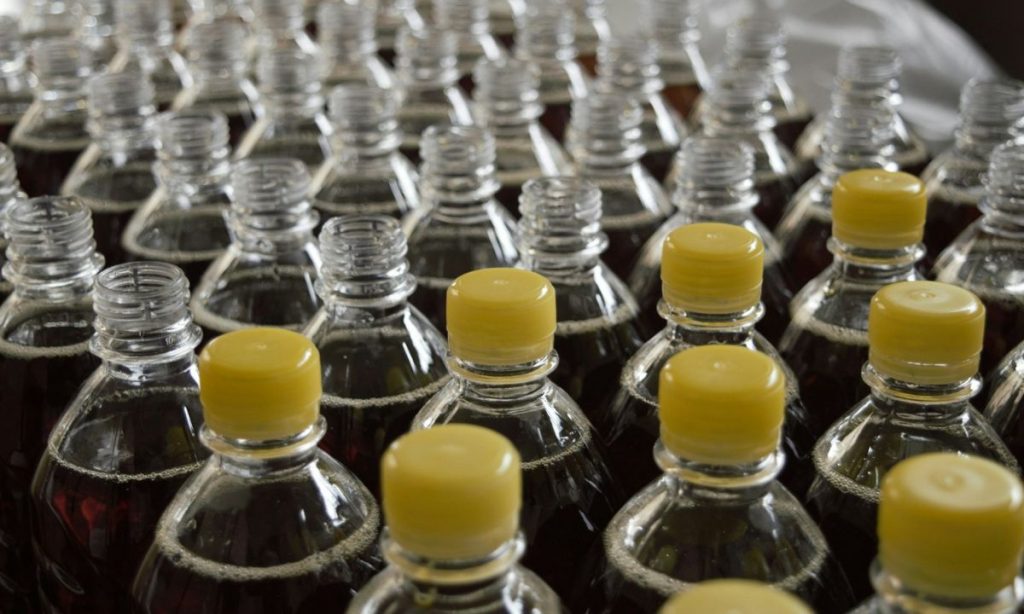
Beer packaging for bottles

Choosing the Right Containers

You’ll want to consider the individual containers that your products come in as well as the shipping container that will be used to transport your products.

  • Glass Bottles and Cans: Ready-to-sell products like glass bottles and aluminum cans are usually packed into cases and then onto pallets. These could be corrugated fiberboard boxes, wooden crates, or cardboard trays wrapped in plastic.
  • Barrels and Kegs: Wooden barrels are traditional for spirits like whiskey and wine. Stainless steel kegs are commonly used for beer and cider. Barrels can be wrapped in plastic or another waterproof material to protect against moisture and other elements.
  • Bulk Containers: For large quantities beer, wine, or spirits that aren’t bottled or canned, shipping in bulk containers like IBCs (Intermediate Bulk Containers) or Flexitanks is common. These containers can hold thousands of liters of liquid and are designed for easy loading and unloading.

Protecting Alcohol During Shipping

The proper packaging can make all the difference in ensuring your alcoholic beverages reach their destination intact. Consider the following:

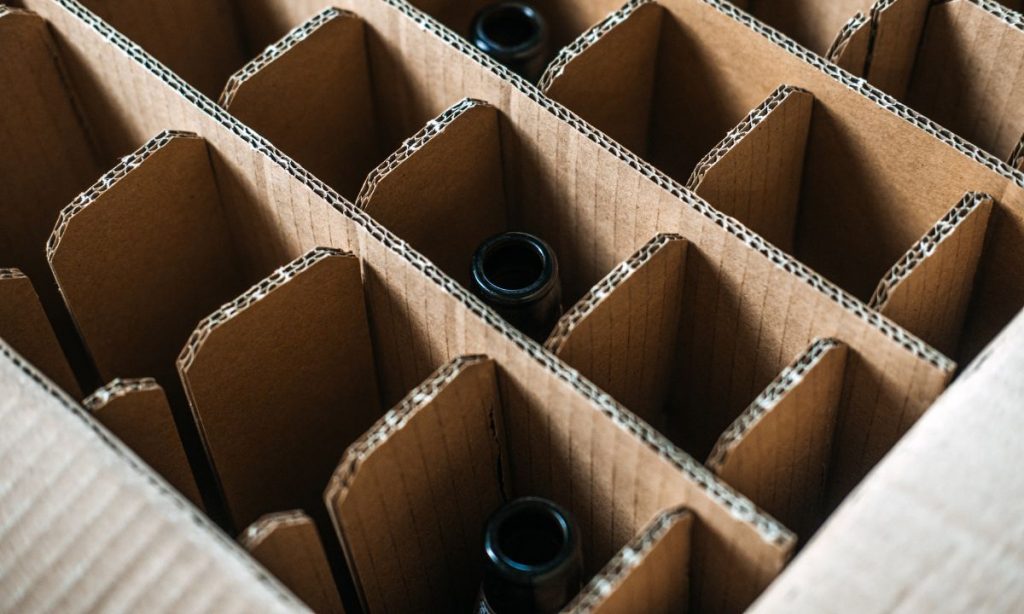
  1. Use Dividers: Keep bottles from knocking into each other by using dividers. These partitions help provide a snug fit, reducing movement and the chance of breakage. These can be corrugated trays, fiber trays, or even plastic trays.
  2. Proper Sealing Is Key: Don’t skimp on sealing tape. Use a high-quality tape to secure all seams and openings firmly, ensuring that the package remains intact throughout its journey.
  3. Cushioning Matters: Surround your product with ample cushioning material—bubble wrap, foam inserts, or air pillows work wonders in absorbing shocks and vibrations during transit.
  4. Check Weight Distribution: Make sure the weight is evenly distributed in each box and container to avoid boxes from becoming top-heavy and tipping over during the shipping process.

Sustainable Packaging Considerations

Sustainable packaging solutions can help support your brand in the eyes of buyers who value environmental stewardship. Materials that can help reduce the environmental impact of packaging and shipping include:

  • Corrugated Cardboard
  • Biodegradable Packing Peanuts
  • Recycled Plastic and Bioplastics
  • Paper Bubble Wrap
  • Kraft Paper
  • Mushroom Packaging
  • Seaweed Packaging
  • Organic Fabrics

As with any eco-friendly material, you’ll have to weigh the benefit compared to the cost of materials. Consider the entire lifecycle of packaging materials too—from production to usage to disposal.

Labeling Considerations for Shipping Alcohol

When shipping alcohol, two of the major labeling considerations to take into account are the labels on the products inside and the shipping labels themselves.

Protecting Product Labels During Shipping

Whether you’re shipping in cans, bottles, kegs, or larger containers, there’s no doubt about it—alcohol labels must endure the elements during the shipping process. After all, no brewery, winery, or distillery wants to see their products on the shelves with tattered and torn labels.

Here are some tips to ensure your labels endure the shipping process:

  • Choose the right high-quality label materials: Your labels are going to have to endure moisture and temperature fluctuations during the shipping process. Choosing label materials that are resistant to scuffing and moisture (for example, BOPP, a synthetic material) will limit damage from the elements.
  • Choose the right adhesive: A label printing company like Blue Label can help you choose the right adhesive to withstand temperature fluctuations and humidity.
  • Protect your labels: Protective coatings like UV varnishes or lamination can provide an additional barrier against moisture, light exposure, or even damage from friction.

Choosing Alcohol Shipping Labels

You’ll need shipping labels for the boxes, pallets, or containers in which your alcohol is shipped. Obviously these labels will have your business address and the address of the destination, but you’ll also have to follow certain rules and regulations to ensure your shipping labels are compliant:

  • Federal Regulations: Your shipping labels must include your permit number and must clearly identify the type of alcohol inside the package (i.e. beer, wine, liquor, etc.). Labels must also include the origin and the destination of the shipment.
  • State Regulations: While each state will have its own regulations, states may require the following: shipper’s license number, quantity limits detailed on the label, and purchase method (i.e. online/phone)
  • Carrier-Specific Requirements: Each carrier (ex: FedEx, UPS) will have their own requirements, but expect carriers to require an adult signature from the recipient and specific labeling indicating that the package contains alcohol.

While regular shipping labels will get the job done, specialized shipping labels that feature your branding can add a visual appeal to packaging seen by consumers and buyers alike. If you’re thinking about branded shipping labels, remember the following:

  • Be sure to incorporate mandatory regulatory information
  • Ensure that your design doesn’t obscure any legally required information
  • Consider implementing a QR code to link to your company’s website, product details, or promotional videos

Special Considerations for Beer, Wine, and Spirits

While many of the regulations for shipping alcohol are consistent no matter the type of alcohol, there are some things to consider depending on what you’re shipping:

  • Shipping Beer: When bottled or canned, shipments of beer can be sensitive to changes in pressure and temperature—packaging that prevents agitation and extreme temperature changes is important. Since beer bottles are particularly delicate, using strong materials, dividers, and cushioning will help protect your product.
  • Shipping Wine: Wine is also sensitive to temperature changes—using temperature-controlled shipping methods or even insulated packaging can help protect the quality of the wine. Bottles of wine are also typically shipped on their sides to keep the cork moist, which helps maintain the seal and prevent oxidation.
  • Shipping Spirits: Spirits with high alcohol content may actually classify these products as hazardous materials under certain shipping regulations. This may require special handling, labeling, and compliance with material shipping laws. In addition, high-strength seals and tamper-evident packaging can help protect liquor bottles during the shipping process.

Staying Updated and Avoiding Common Mistakes

In the world of alcohol shipping, staying informed can help you avoid common pitfalls. Here’s how to stay up-to-date:

  • Embrace Continuous Learning: Regulations around packaging and shipping alcohol aren’t set in stone; they change with time. Subscribing to industry newsletters, attending webinars, or joining trade associations are excellent ways to stay on top of changes. This proactive approach helps avoid mistakes that could cost you in terms of compliance violations or damaged goods.
  • Leverage Technology for Efficiency: Innovations like smart labels (which track a package’s journey) or eco-friendly materials (that appeal to green-minded consumers) not only streamline operations but can also improve your brand’s reputation for innovation and responsibility.

Conclusion

We’ve covered the essentials of shipping alcohol—from ensuring safety and compliance to ensuring your product remains intact and appealing once it reaches its destination.

  • Safety and Compliance: These are non-negotiable. The right materials, clear labeling, and the proper licenses are essential to shipping alcohol.
  • Branding: Your packaging is the face of your product. Custom labels and printed boxes can set you apart in a crowded marketplace.
  • Legal Awareness: Staying informed about regional regulations helps avoid costly mistakes.
  • Material Choices: Opting for durable options helps safeguard your products.

Shipping alcoholic beverages requires careful packaging to ensure product safety, regulatory compliance, and brand representation. Don’t risk damaged goods, fines, or an underwhelming customer experience. Blue Label’s experts can help you choose the right packaging and label materials when shipping your beer, wine, or spirits products.

dgrgrgrg

gtgthgyhy